Craftsman 54 Inch Mower Deck Belt Diagram and Maintenance Guide
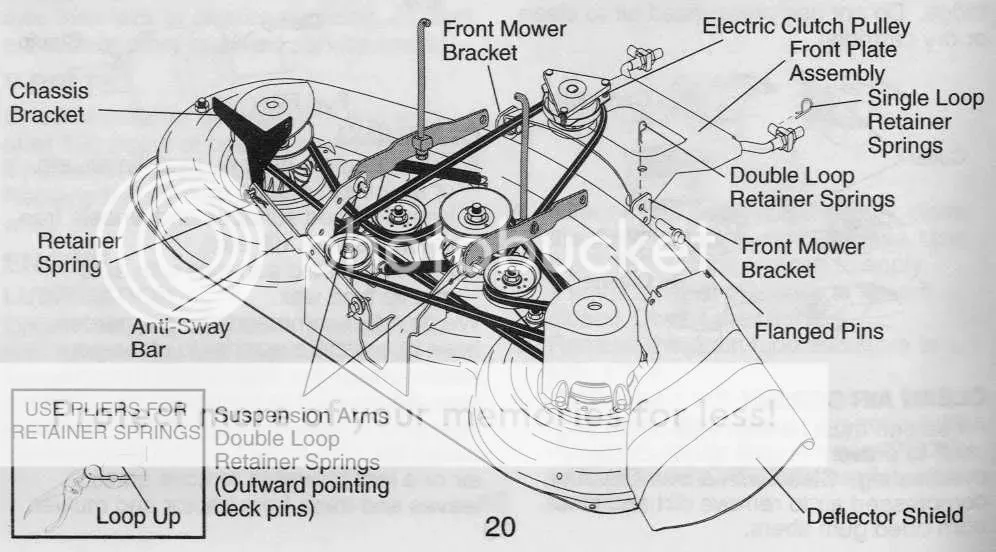
If you’re facing issues with your Craftsman 54-inch mower deck belt, refer to the diagram below for a quick and clear understanding of the belt routing. This will help ensure you’re installing the belt correctly, saving you time and avoiding frustration. The diagram shows the precise path of the belt through pulleys, ensuring the deck operates smoothly and efficiently.
Pay attention to pulley alignment when working with your mower deck belt. A misaligned belt can cause wear and tear, leading to more frequent replacements. Always check the routing to ensure the belt isn’t twisted or out of position. This diagram also highlights the tensioning system–if the belt feels too loose or tight, adjust the spring tension accordingly.
Before replacing or adjusting the belt, disconnect the mower from the power source to prevent accidental startup. After confirming the diagram matches your mower’s configuration, carefully remove the old belt and replace it with a new one of the correct size. Take note of any differences in pulley configurations between models to ensure compatibility.
Once the new belt is in place, inspect the system for any abnormalities, such as unusual slack or fraying, and verify the mower’s operation to confirm everything is running smoothly.
Craftsman 54 in Mower Deck Belt Diagram
For accurate assembly of the Craftsman 54-inch mower deck, follow this belt diagram carefully. It ensures the proper routing of the drive belt, avoiding unnecessary wear and breakdowns. Begin by positioning the belt around the engine pulley, then route it through the idler pulley. Make sure the belt is tight enough to prevent slippage, but not so tight that it causes unnecessary strain on the pulleys.
The deck’s belt needs to pass over the mower blades’ pulleys in the correct order. Always check the belt’s alignment, ensuring it fits snugly without rubbing against any parts of the deck. Adjust the tension using the spring-loaded idler arm to ensure smooth and consistent belt movement during operation.
Double-check all connections, including the pulley mounts and the idler arm’s positioning, before reinstalling the deck. Misalignment can result in uneven blade rotation, decreasing performance. Always refer to the model’s specific diagram for pulley locations to avoid mistakes and ensure a hassle-free mowing experience.
How to Identify the Correct Belt Routing for Craftsman 54 in Mower Deck
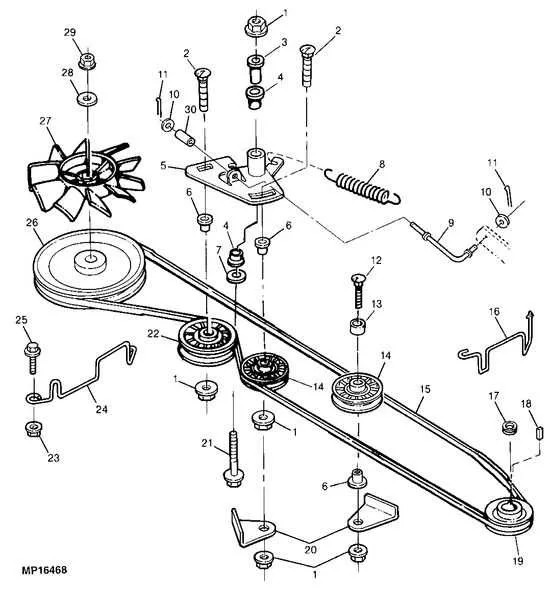
To correctly route the belt on your Craftsman 54-inch mower deck, start by ensuring that the belt is the right size for your model. Verify the part number, as this ensures compatibility with the pulley system. Once you have the correct belt, follow these steps:
1. Identify the position of the engine pulley. This pulley is usually the driving component and should be at the front of the mower deck. The belt will loop around this pulley first.
2. Move the belt along the front idler pulley. This pulley helps keep tension on the belt, ensuring smooth operation of the cutting blades. Ensure the belt is placed correctly over the idler pulley to prevent slippage.
3. Next, route the belt through the main deck pulleys. These pulleys control the spinning of the mower blades. Double-check that the belt is seated properly on each pulley, with no twists or misalignments.
4. The belt then moves back to the rear idler pulley. This pulley adjusts tension for the entire system, helping to keep the belt tight and avoid unnecessary wear.
5. Finally, the belt should loop back to the engine pulley, completing the loop. Make sure the belt has the correct tension at this point by pressing lightly on it. If the belt has too much slack, adjust the idler pulley to tighten it.
Always refer to your mower’s manual for any specific routing details, as slight variations may exist depending on your model. Checking each pulley and ensuring proper tension will help the mower run smoothly and avoid unnecessary damage.
Step-by-Step Guide to Replacing the Mower Deck Belt on Craftsman 54 in
Replacing the mower deck belt on a Craftsman 54-inch lawn mower is straightforward when you follow these clear steps. With the right tools and safety precautions, you can get your mower back in action quickly.
- Lift the Mower Deck: Use a jack or lift to elevate the mower deck. Secure it to avoid any accidents while working underneath.
- Disconnect the Battery: Always disconnect the battery before performing any maintenance to ensure safety.
- Remove the Old Belt: Locate the belt tensioner. Use a wrench to relieve tension and slide the belt off the pulleys. Be sure to remember the exact routing of the belt to avoid mistakes when installing the new one.
- Inspect Pulley and Deck Condition: Before installing the new belt, check the pulleys for damage or debris. Clean any build-up to ensure smooth operation.
- Install the New Belt: Follow the original belt routing pattern carefully. Begin by sliding the belt over the pulleys and around the spindles. Ensure it fits snugly in place on all pulleys.
- Adjust the Tensioner: Reinstall the tensioner to apply the correct tension to the new belt. Double-check the belt’s position on all pulleys to ensure proper alignment.
- Reconnect the Battery: Once everything is reassembled, reconnect the battery and lower the mower deck.
- Test the Mower: Start the mower and run it at low speed for a few minutes to check for any unusual noise or movement. Ensure the belt operates smoothly.
With these steps, your Craftsman 54-inch mower will be ready to go. Regular maintenance like belt replacement will extend the life of your mower and improve cutting performance.
Troubleshooting Common Issues with the Belt on Craftsman 54 in Mower Deck
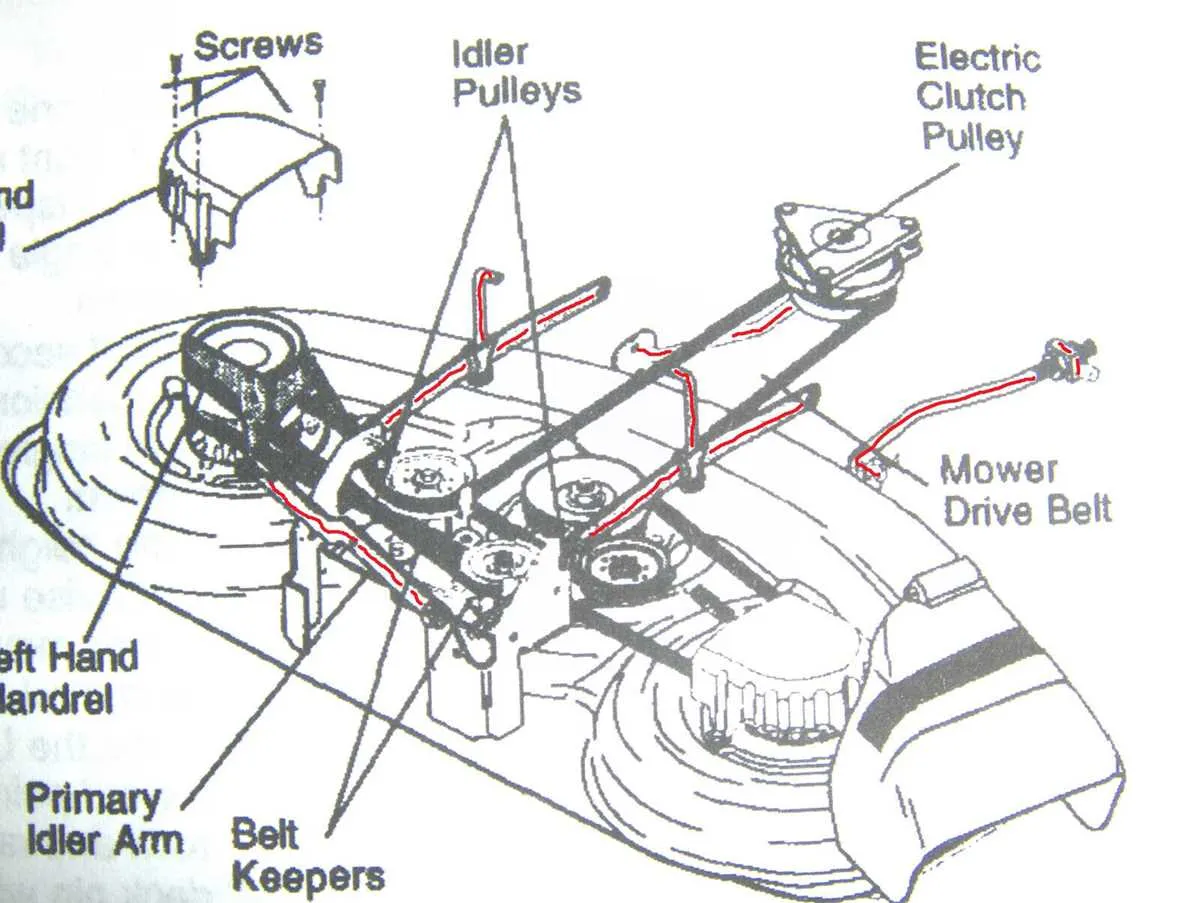
If your mower’s belt is slipping or not functioning correctly, start by checking for wear and tear. Inspect the belt for cracks or fraying. A worn-out belt will need replacing to restore smooth operation.
Another issue is misalignment. Ensure the belt is properly aligned with the pulleys. If it’s off-center, the mower will struggle to cut effectively. Adjust the tension or realign the belt to the correct path as shown in the belt diagram.
Check the tension on the belt. If it’s too loose, it won’t transfer enough power to the blades, reducing cutting efficiency. Use the tension adjuster to tighten the belt slightly until the blades engage properly. If the belt is too tight, it can cause unnecessary strain on the engine.
Look for obstructions in the pulley system. Debris like grass clippings can build up and affect the performance of the belt. Clean the pulleys and the surrounding area to ensure everything moves freely.
Lastly, inspect the pulleys themselves for damage. Worn-out or misaligned pulleys can cause the belt to malfunction. Replace any faulty pulleys to restore proper function.