Complete John Deere Z225 Belt Diagram for Accurate Installation and Maintenance
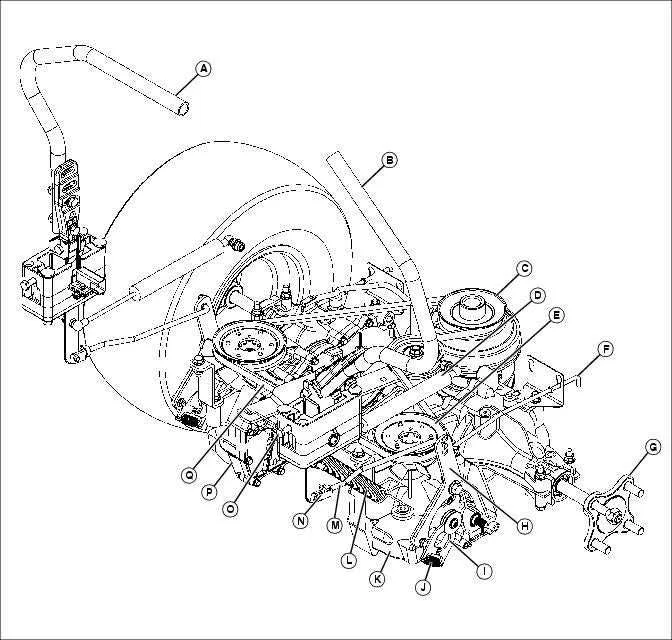
Check the routing of the mower deck and engine belts before performing any maintenance to avoid incorrect installation. The Z225 uses a single drive belt for the transmission and a separate mower deck belt, each with a specific path that must be followed for proper operation.
Identify the belt types clearly: the drive belt is longer and engages multiple pulleys connected to the engine and transmission, while the mower deck belt is smaller, looping around the deck pulleys. Verify the part numbers stamped on each belt to ensure replacement matches the original specifications.
Inspect the tensioners and pulleys for wear or misalignment. Misaligned pulleys can cause premature belt damage or slipping. Rotate the pulleys manually to detect rough spots or wobbling that indicates the need for replacement or adjustment before reinstalling belts.
Use the diagram as a reference during removal and installation. Follow the exact path for each belt, paying attention to the orientation around idler pulleys and guides. Double-check engagement points to confirm the belts sit properly before running the engine.
Maintain a clean work area and keep spare hardware handy. Small parts such as spring clips, washers, and bolts are easy to misplace, and securing them properly ensures smooth operation of the Z225 after belt replacement.
John Deere Z225 Belt Diagram Practical Guide for Maintenance and Replacement
Refer to the Z225 belt diagram to identify each belt route before performing maintenance. This visual reference ensures proper alignment and prevents misrouting, which can damage pulleys or the deck.
Inspect belts for cracks, fraying, or glazing. Replace any belt showing wear signs immediately. Check the tension using a spring scale or by pressing the belt midpoint; it should deflect roughly 1/2 inch under moderate pressure on the mower deck belt.
Follow these steps for replacement:
- Park the mower on level ground, engage the parking brake, and disconnect the spark plug to prevent accidental start.
- Remove the mower deck by lowering it fully and detaching the lift pins and spindles according to the diagram.
- Release belt tension from the idler pulleys using a wrench or lever, following the belt diagram for correct path.
- Slide the worn belt off the engine and deck pulleys, noting routing positions.
- Install the new belt by aligning it with the pulleys as shown in the diagram, ensuring it sits fully in each pulley groove.
- Re-engage the idler pulleys to apply tension, checking that the belt moves freely without binding.
- Reattach the mower deck, confirm all pins and fasteners are secure, and reconnect the spark plug.
Regularly clean debris from the pulleys and deck to prevent premature belt wear. Use the diagram as a reference whenever removing the deck for maintenance, ensuring the new belt is routed correctly each time.
Check belts periodically, particularly after mowing thick grass or uneven terrain. Adjust tension according to the diagram’s guidance to maintain smooth operation and extend belt life.
Locate and Identify All Z225 Belt Components
Begin by placing the John Deere Z225 on a level surface and engaging the parking brake. Remove the mower deck for full access to the belt path. Identify the drive belt first, which loops around the engine pulley, deck pulleys, and idler pulleys.
Next, locate the engine pulley at the front of the mower. This large pulley drives the main belt and sits directly on the crankshaft. Confirm its alignment with the idler pulley mounted on the mower frame; this pulley maintains proper belt tension during operation.
Inspect the deck pulleys on each side of the mower deck. These pulleys guide the belt under the deck to the spindles that rotate the blades. Make sure each spindle pulley spins freely and is free of debris.
Identify any additional idler pulleys along the belt path. These smaller pulleys redirect the belt and prevent slack. Note the spring tensioner connected to one idler pulley, which automatically adjusts tension to maintain smooth operation.
Trace the belt path completely, confirming the belt sits in all pulley grooves without twisting. Check for signs of wear on each component, including cracks, fraying, or glazing on the belt, and ensure pulleys rotate smoothly without wobble.
Label each component for future reference: engine pulley, idler pulleys, deck pulleys, and spring tensioner. This labeling helps during replacement or reinstallation and ensures correct belt routing.
Step-by-Step Instructions to Remove and Replace the Belt
Park the mower on a level surface and engage the parking brake. Turn off the engine and remove the key to prevent accidental starts.
Raise the mower deck to its highest position using the deck lift lever. This provides clear access to the belt and pulleys underneath.
Locate the belt routing and take a clear photo or sketch. This ensures correct reinstallation and prevents misalignment.
Release belt tension by locating the idler pulley and using a wrench to rotate it, moving the tensioner arm away from the belt. Carefully slide the belt off the pulleys while keeping your hands clear of pinch points.
Inspect pulleys and deck components for wear, debris, or damage. Clean pulleys and remove any buildup to prevent premature belt wear.
Position the new belt following the routing diagram. Start by wrapping the belt around the engine pulley, then the idler pulleys, and finally the deck pulleys. Ensure the belt sits fully in the pulley grooves without twisting.
Reapply tension by carefully releasing the idler pulley. Verify that the belt maintains proper tension and alignment across all pulleys.
Lower the mower deck slowly to the operating position. Double-check the belt path and confirm smooth movement by manually rotating the engine pulley.
Start the mower briefly to test belt function. Listen for unusual noises and observe belt tracking to confirm correct installation.
Check Belt Alignment and Adjust Tension for Proper Operation
Place the John Deere Z225 on a flat surface and ensure the parking brake is engaged. Begin by visually inspecting the mower deck and engine pulleys for any misalignment or wobbling.
Use a straightedge or a laser alignment tool across the pulleys to confirm that the belt path is perfectly straight. Misaligned pulleys can cause uneven wear or premature belt failure.
Locate the tension adjustment bolt on the idler pulley. Turn the bolt clockwise to increase tension or counterclockwise to decrease tension. The belt should deflect approximately 1/2 inch (12 mm) at the midpoint between the engine pulley and the mower deck pulley when pressed with moderate finger pressure.
Rotate the pulleys by hand to verify smooth movement and check for any slipping. Listen for unusual squeaking, which may indicate improper tension or worn components.
After adjusting, secure all bolts and recheck alignment. Run the engine briefly to confirm the belt operates quietly and maintains proper tracking along all pulleys.
Inspect the belt for cracks, fraying, or glazing during this process. Replace any belt showing significant wear to maintain consistent mower performance.