John Deere LX176 belt diagram with routing guide and mower deck installation details
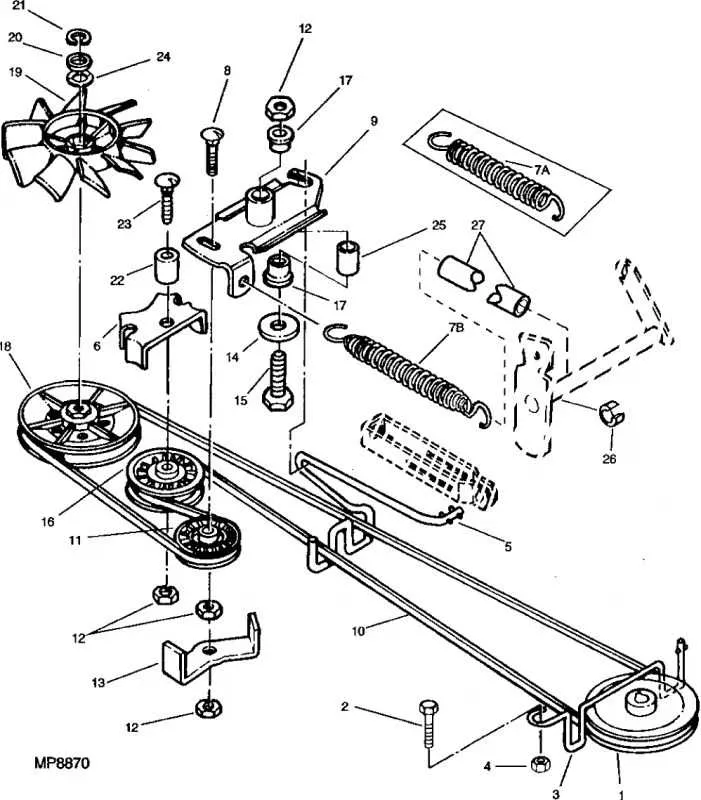
Check the routing of the mower deck belt before removing it to avoid confusion during reinstallation. The LX176 uses a primary drive belt that connects the engine pulley to the deck system, and a secondary belt that transfers motion to the blades. Study the diagram carefully and match each pulley and idler to its correct position.
Use the diagram to confirm the belt passes over and under the correct pulleys without twisting. A misaligned belt causes uneven cutting and premature wear. Pay close attention to the spring-loaded idler, as it maintains proper tension and must be routed exactly as shown.
Inspect the belt path while comparing it to the diagram to spot signs of rubbing or fraying. Replace any pulley with a worn bearing before fitting a new belt. This prevents repeated failures and ensures smooth operation of the mower deck.
John Deere LX176 Belt Diagram
Follow the belt diagram of the John Deere LX176 to route the mower deck belt correctly. The belt connects the engine pulley to the deck pulleys and must run in the exact order shown in the diagram to prevent slipping or premature wear.
Key routing points include:
- The primary drive belt runs from the engine pulley down to the deck drive pulley.
- The belt passes around the idler pulley, which maintains proper tension.
- The mower deck spindles connect to the belt, ensuring even rotation of the blades.
- A spring-loaded tensioner keeps the belt tight during operation.
When replacing the belt, always:
- Disengage the mower deck and lower it to the ground.
- Release the tensioner spring to remove the old belt.
- Route the new belt following the diagram, making sure it sits inside every pulley groove.
- Reconnect the tensioner spring and check alignment before starting the engine.
Check the belt diagram on the mower deck or operator’s manual for confirmation, as incorrect routing can cause vibration or blade stoppage. Always use the specified John Deere replacement belt to match the original length and width.
Correct Belt Routing for the John Deere LX176 Mower Deck
Place the belt around the engine drive pulley first, ensuring the grooved side sits firmly in the pulley channels. Next, route the belt toward the deck idler pulleys, making sure the flat side contacts the flat pulleys and the ribbed side matches the V-shaped pulleys.
Guide the belt around the spindle pulleys so that it drives both mower blades evenly. Check that the belt follows the factory path: from the drive pulley to the right idler, across both blade pulleys, and then back through the left idler before returning to the drive pulley. Keep the belt tight and aligned in every pulley groove.
After routing, pull the tensioner spring into place to maintain proper belt tension. Rotate the blades by hand to confirm that the belt moves smoothly without slipping or twisting. Adjust the idler arm if necessary to remove slack. This setup ensures reliable power transfer from the engine to the cutting blades.
How to Replace the Drive and Deck Belts on the LX176
Park the mower on a flat surface, engage the parking brake, and remove the ignition key. Disconnect the spark plug wire to prevent accidental starting.
Drive belt replacement: Remove the mower deck to gain access to the underside of the tractor. Release belt tension by moving the idler pulley spring. Slip the worn belt off the engine pulley and transmission pulley. Route the new belt around the pulleys following the factory diagram, making sure it sits correctly in the grooves. Reattach the idler spring to restore tension.
Deck belt replacement: Lower the mower deck to its lowest cutting position. Release the tension arm to free the belt from the pulleys. Remove the belt from the spindle pulleys and idler pulleys, then pull it off the engine pulley. Install the new belt by threading it around the spindle pulleys first, then around the idler pulleys, and finally onto the engine pulley. Re-engage the tension arm to secure the belt.
Check belt alignment by rotating the pulleys by hand. Reinstall the mower deck, reconnect the spark plug wire, and perform a short test run to confirm smooth operation without slipping or noise.
Troubleshooting Common Belt Wear and Slippage Problems
Check belt tension first. A loose belt on the LX176 often causes slippage and uneven cutting. Adjust the idler pulley spring until the belt feels snug but not overly tight. A belt that is too tight can strain bearings and pulleys.
Inspect the belt surface closely. Glazing or shiny spots usually mean the belt has been slipping for a while. Replace the belt if you see cracks, fraying edges, or flat spots, since these signs indicate it will not grip the pulleys properly.
Examine pulleys for wear. Grooves packed with dirt or rust create drag and damage the belt surface. Clean pulleys thoroughly and replace any that wobble or have sharp edges, since these will shorten belt life and cause repeated slippage.
Check alignment of the pulleys and guides. A misaligned deck pulley or bent guide will force the belt to run off track. Realign brackets and confirm the belt follows the routing diagram without twisting.
Look at the idler pulley bearings. If they spin roughly or make noise, they can prevent the belt from maintaining proper grip. Replacing worn idlers often solves persistent slippage without needing further adjustments.