Craftsman ZTS 7000 Mower Belt Diagram with Clear Pulley and Routing Details
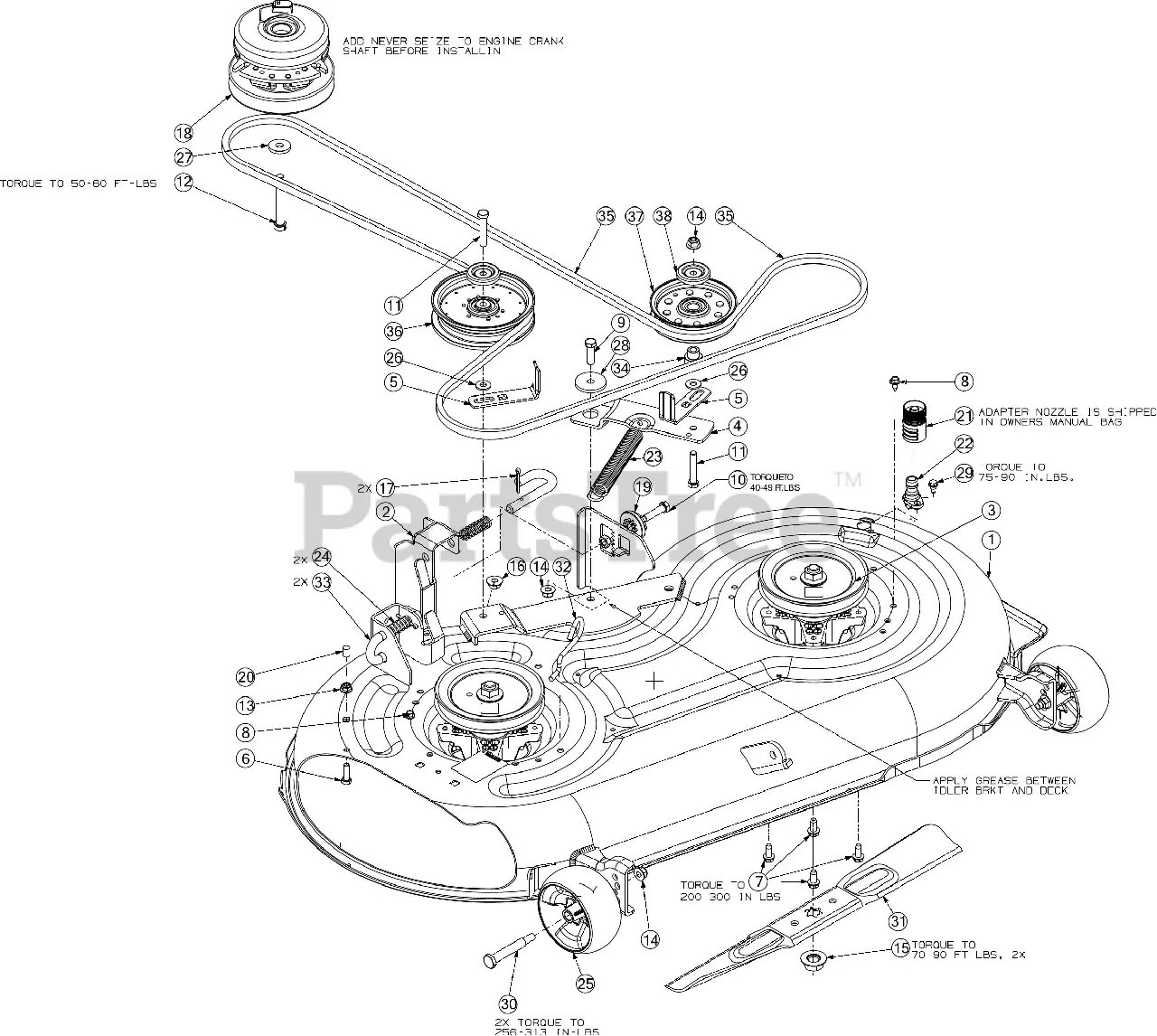
Replace the drive belt on the Craftsman ZTS 7000 by first referencing the correct diagram located under the mower’s seat or inside the owner’s manual. The diagram shows the precise routing path, including pulley positions, belt tensioner location, and mower deck orientation. Skipping this step often leads to misalignment and premature belt wear.
The belt wraps around the PTO pulley, idler pulleys, and the transmission drive pulley. On most ZTS 7000 models, the deck belt routing starts at the electric clutch mounted on the engine crankshaft, then moves through a combination of fixed and spring-loaded pulleys. Always disengage the PTO and remove the ignition key before servicing the belt system to prevent injury.
Use a 5/8-inch wrench to release tension from the spring-loaded idler arm when removing or installing the belt. Make sure the new belt matches the OEM specifications–typically a Kevlar-reinforced belt labeled as part number 583909401 for the 54-inch deck. Recheck pulley alignment and deck level after installation to ensure smooth operation.
Craftsman ZTS 7000 Belt Diagram
Use the belt diagram located under the mower deck panel to confirm routing before installation. For the Craftsman ZTS 7000, the primary drive belt runs from the engine pulley at the rear of the mower to the transaxle pulleys on both sides. It follows a tensioner pulley, which maintains proper belt tension during operation.
The mower deck belt connects the PTO clutch to the blade spindles and two idler pulleys. Make sure the belt passes inside the fixed guide brackets and behind the deck tensioner arm to prevent misalignment during mowing. The diagram also shows the correct direction of belt grooves: V-side into pulleys and flat-side against flat idlers.
Before replacing the belt, disconnect the spark plug and lower the deck. Release belt tension by loosening the tensioner spring with a 3/8″ drive ratchet. Match the new belt to the original in both length and profile–typically a 5/8″ width, heavy-duty Kevlar type. Avoid twisting the belt during installation to prevent premature wear.
Once installed, engage the PTO briefly to check for vibration or noise. Recheck the routing against the diagram if anything seems off. Always re-secure deck guards and panels after servicing to maintain safety.
How to Identify the Correct Belt Routing for the Craftsman ZTS 7000 Mower Deck
Check the underside of the mower deck for a factory-installed routing decal. Craftsman typically places this diagram on the left or right side near the deck shell or on the deck cover itself. If the decal is missing or damaged, refer to the specific model number printed under the seat or near the mower’s frame before searching for diagrams.
Match the belt type with your mower deck configuration. The ZTS 7000 may come with either a 54-inch or 61-inch cutting deck. Each deck uses a different routing pattern and belt length. Use only OEM replacement belts that match your deck width–incorrect belt length or width leads to slippage or uneven tension.
Inspect the pulleys and idler arms to understand the routing path. The belt should wrap around the spindle pulleys, engage the tensioner pulleys, and return to the drive pulley without twisting. The flat side of the belt must contact flat pulleys, while the V-side fits inside grooved pulleys.
Use a socket wrench to relieve tension on the spring-loaded idler arm while positioning the belt. Route the belt by hand, starting at the deck’s center spindle and moving outward to avoid kinks. Recheck alignment before releasing the tensioner.
Spin the blades manually to confirm smooth movement and consistent tension across all pulleys. A clicking sound, uneven rotation, or loose slack suggests incorrect routing or a worn tensioner spring.
Steps to Replace the Drive Belt on a Craftsman ZTS 7000
Disconnect the spark plug wire to prevent accidental engine start. Engage the parking brake and ensure the mower is on a flat, stable surface. Use wheel chocks if needed.
Lower the mower deck to its lowest position. Remove the deck by detaching the support pins and sliding it out from under the mower frame. Note belt routing before removal or take a photo for reference.
Use a socket wrench to remove the bolt from the engine pulley. Carefully take off the old drive belt. Inspect all pulleys for damage or excessive wear before installing the new belt.
Route the new belt following the exact factory configuration. Ensure it sits correctly in all pulley grooves, including the transmission and engine pulleys. Reinstall the engine pulley bolt and tighten it securely.
Slide the mower deck back into place and reconnect all support pins and linkage arms. Double-check belt alignment before proceeding. Reconnect the spark plug wire.
Start the mower and engage the drive system briefly to verify proper belt operation. Shut off the engine and recheck belt tension. If everything is secure and functioning correctly, the replacement is complete.
Troubleshooting Belt Slippage and Misalignment on the ZTS 7000
Replace any worn or glazed belts immediately. A slipping belt often shows smooth, shiny surfaces or frayed edges, especially near pulleys.
- Check belt tension: With the engine off, press down midway between pulleys. The belt should flex about 1/2 inch. If it moves more, adjust the idler pulley to restore proper tension.
- Inspect pulley alignment: Misaligned pulleys cause the belt to track unevenly. Use a straightedge across the faces of adjacent pulleys. Realign any that deviate from the plane.
- Clean pulley grooves: Debris and rust reduce belt grip. Use a wire brush or fine sandpaper to clean the contact surfaces thoroughly.
- Check for worn bearings: Wobbling pulleys often indicate bad spindle or idler bearings. Replace damaged components to prevent lateral belt movement.
- Secure all mounting hardware: Loose bolts on the deck or engine mounts cause vibration that affects belt tracking. Tighten all hardware to manufacturer torque specs.
After adjustments, engage the PTO at low throttle and observe belt tracking. If it walks off-center or chatters, repeat alignment checks and confirm tension. For consistent issues, inspect the belt routing diagram under the mower deck cover and confirm proper path around all pulleys.