Cub Cadet LT1042 Deck Belt Diagram and Installation Guide
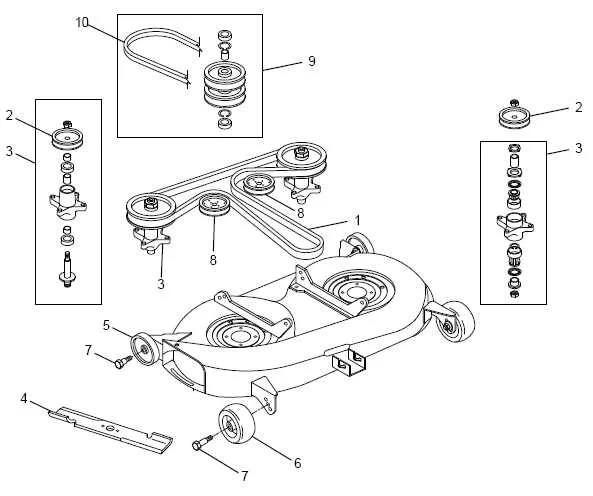
To restore the performance of your Cub Cadet LT1042, replacing or adjusting the deck belt is often necessary. The deck belt transfers power from the engine to the blades, ensuring a smooth cutting experience. A properly installed belt is crucial for optimal functionality. This diagram shows the correct routing of the deck belt to help you get your mower running at its best again.
The deck belt diagram for the Cub Cadet LT1042 is straightforward but requires attention to detail. Be sure to follow each step in the diagram carefully, as even a small mistake can lead to belt wear or malfunction. Start by identifying the path from the engine pulley to the deck, and then ensure the belt aligns with each guide pulley, idler pulley, and blade drive pulley in the correct order.
If you’re unsure about how the belt should fit, it’s recommended to visually compare the diagram with your mower’s layout. Double-check that the belt isn’t twisted and that it’s positioned snugly in the pulleys. A well-fitted belt will last longer and provide a better mowing performance.
Cub Cadet LT1042 Deck Belt Diagram
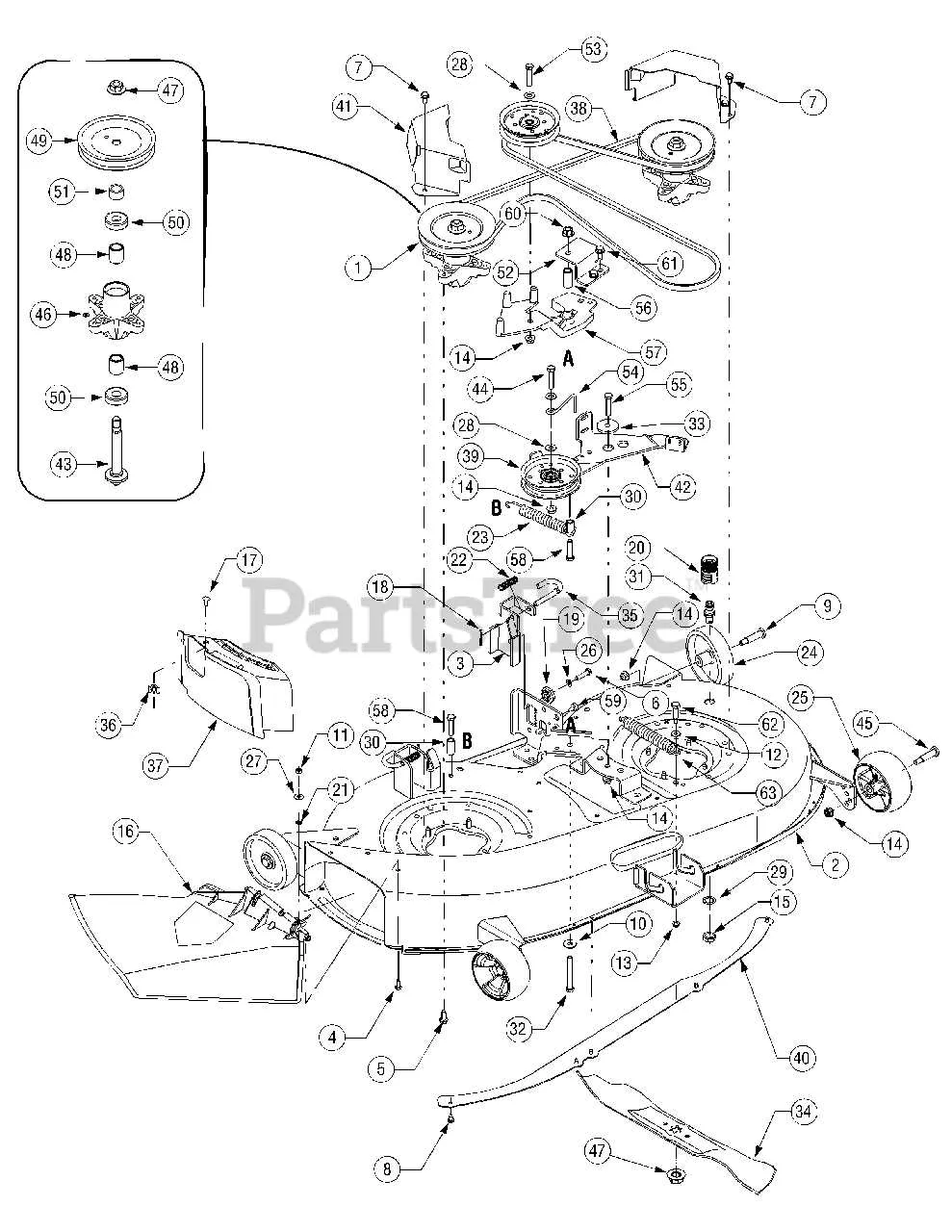
To replace or repair the deck belt on a Cub Cadet LT1042, first ensure you have the correct replacement belt. Refer to the diagram to follow the precise routing of the belt for proper installation. Begin by lifting the mower deck and securing it in place to allow easy access. The belt should be routed through the pulleys and around the tensioner with the correct alignment to avoid unnecessary wear.
Start by locating the idler pulley on the left side of the deck. The belt will loop around this pulley before passing over the two blade spindles. Ensure that the belt follows the grooves on each pulley precisely, as an incorrectly routed belt can cause slippage or premature wear. The tensioner pulley should be placed in such a way that the belt remains tight without excessive slack.
When installing, always check that the belt is securely positioned in the grooves of each pulley, especially the one that drives the blades. An improperly installed belt may not engage the mower blades properly, leading to reduced cutting efficiency.
Once the belt is installed, double-check all pulley placements and the alignment of the tensioner to ensure the belt stays in place during operation. After reassembling the deck and testing the mower, make sure the belt doesn’t slip or show signs of excessive friction. A well-maintained deck belt will extend the life of your mower and keep it running smoothly.
How to Identify the Correct Deck Belt for Cub Cadet LT1042
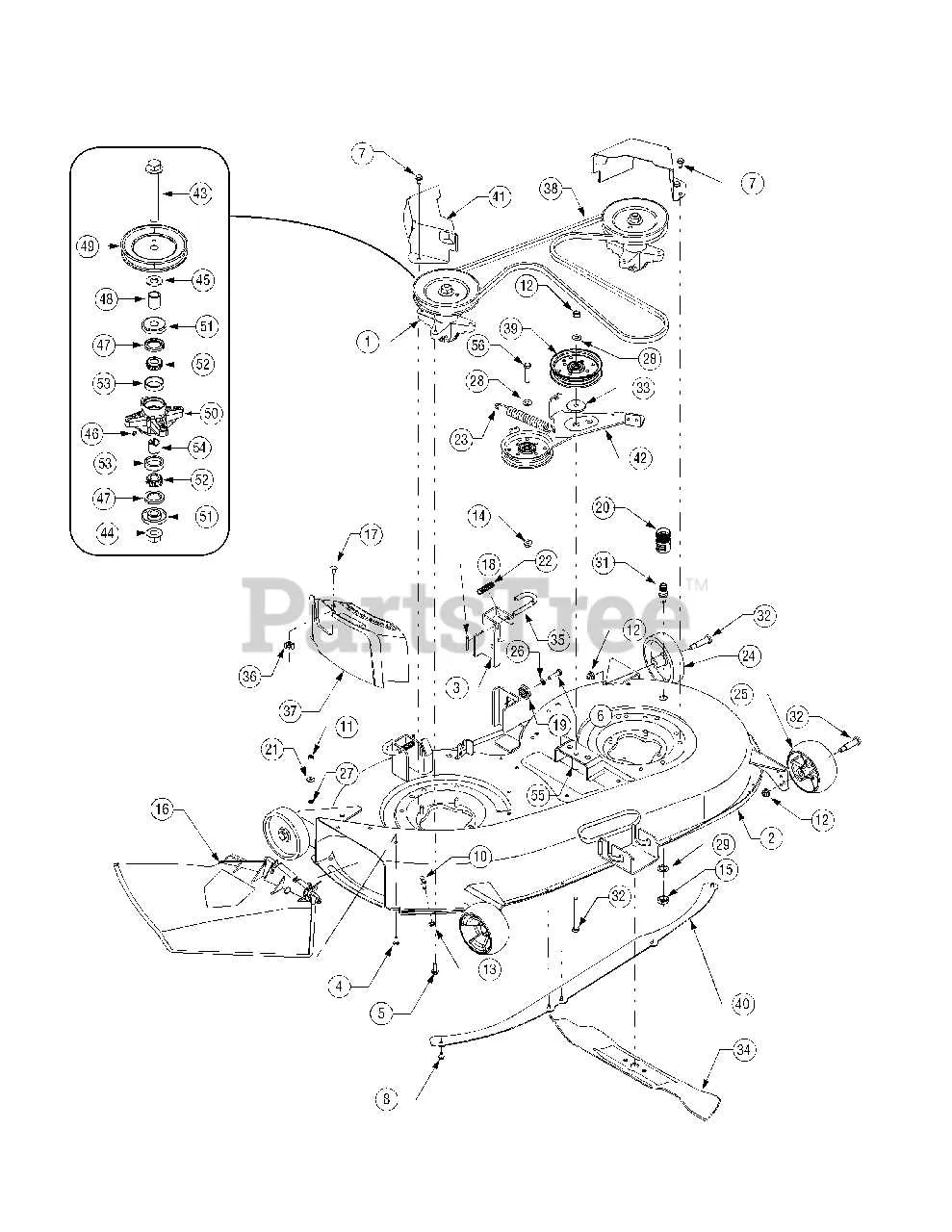
Check the model number of your Cub Cadet LT1042 to find the right deck belt. The LT1042 typically uses a 42-inch cutting deck, which requires a specific belt size. The correct part number for the deck belt is often listed in your owner’s manual or on the manufacturer’s website.
For easy identification, here’s what to look for:
- Ensure the belt is the correct length. For the LT1042, the belt is usually around 95 inches long.
- Confirm the belt’s width, which is typically 0.5 inches.
- Verify the belt’s shape; it’s usually a V-belt designed for the specific tension and load requirements of the Cub Cadet LT1042 deck system.
If you don’t have access to the manual, you can find the part number and specifications through the Cub Cadet website or local authorized dealers. Make sure the belt matches the original to avoid any fitting issues or wear.
After purchasing the new belt, compare it with the old one to ensure the dimensions match. If the original belt is too worn to measure accurately, consult your local dealer for confirmation.
Lastly, ensure the belt routing diagram is available for your specific LT1042 model, as improper installation can damage the belt or the mower.
Step-by-Step Guide to Installing the Deck Belt on Cub Cadet LT1042
First, raise the front of the mower using a jack to ensure proper clearance for accessing the deck area. Secure the mower to prevent any movement during the process.
Next, disconnect the negative battery cable to avoid any electrical issues. Remove the deck by loosening the bolts holding it in place. Be careful while handling the deck to prevent damage to the belt or pulleys.
Once the deck is removed, locate the old belt and check its routing on the pulleys. Take note of how it’s installed, as this will be useful when installing the new belt. If needed, refer to the belt diagram specific to the LT1042 model for accurate belt routing.
Release any tension on the belt by moving the idler pulley or removing the tension spring. This step will make it easier to slide the old belt off the pulleys.
Now, take the new deck belt and begin threading it through the pulleys, ensuring the proper alignment with each one. Follow the belt routing diagram carefully to avoid mistakes. The belt should be tight but not over-stretched; make sure it sits properly on the pulleys without any slack.
Once the belt is in place, reattach the deck to the mower by securing the bolts. Make sure the deck is properly aligned and centered.
Next, restore tension to the belt by securing the idler pulley or reinstalling the tension spring. This will ensure the belt has the right tension for smooth operation.
Finally, reconnect the battery cable and test the mower by running it at low speed. Check for any unusual noises or vibrations. If the belt is properly installed, the mower should operate smoothly.
Common Issues with Deck Belt on Cub Cadet LT1042 and How to Fix Them
If the deck belt on your Cub Cadet LT1042 isn’t working properly, it can lead to poor mower performance or complete failure to cut grass. Common issues include slipping, breaking, or misalignment. Here’s how to address them:
Belt Slipping – This usually happens when the belt becomes loose or worn. Check the belt tension and ensure it’s adjusted properly. If the belt shows signs of wear, it’s time to replace it. You can tighten the tension by adjusting the idler pulley. Keep an eye on the belt alignment too–misalignment can cause the belt to slip off or wear unevenly.
Belt Breakage – A snapped belt can be caused by excessive wear, incorrect installation, or debris interfering with the belt path. To avoid this, inspect the belt regularly for fraying or cracks. If it breaks, replace it with the correct Cub Cadet LT1042 replacement part. Always check the pulleys and spindles to make sure they’re free from any obstruction or damage that could strain the belt.
Misalignment of the Belt – When the belt doesn’t sit properly on the pulleys, it can lead to excessive wear or damage. Make sure all pulleys and guide wheels are in good condition and that they align correctly. If necessary, adjust the deck’s height to ensure everything is in place. Sometimes, dirt or debris can throw off the alignment, so keep the deck clean for smoother operation.
Excessive Vibration – If the deck belt is causing the mower to vibrate, it could indicate an issue with the belt’s tightness, pulley alignment, or the presence of foreign objects in the deck. Inspect the entire system for damage, and clean any debris that may be caught around the pulleys. Tighten or replace the belt if needed, and check the deck for any loose parts that might be contributing to the issue.
Incorrect Belt Routing – Sometimes, the belt may come off if it is not routed correctly through the pulleys. Refer to the LT1042 deck belt diagram to ensure the belt is following the proper path. Recheck the installation to ensure everything matches the diagram and is securely in place.