2005 Honda CRV Serpentine Belt Diagram and Installation Layout Guide
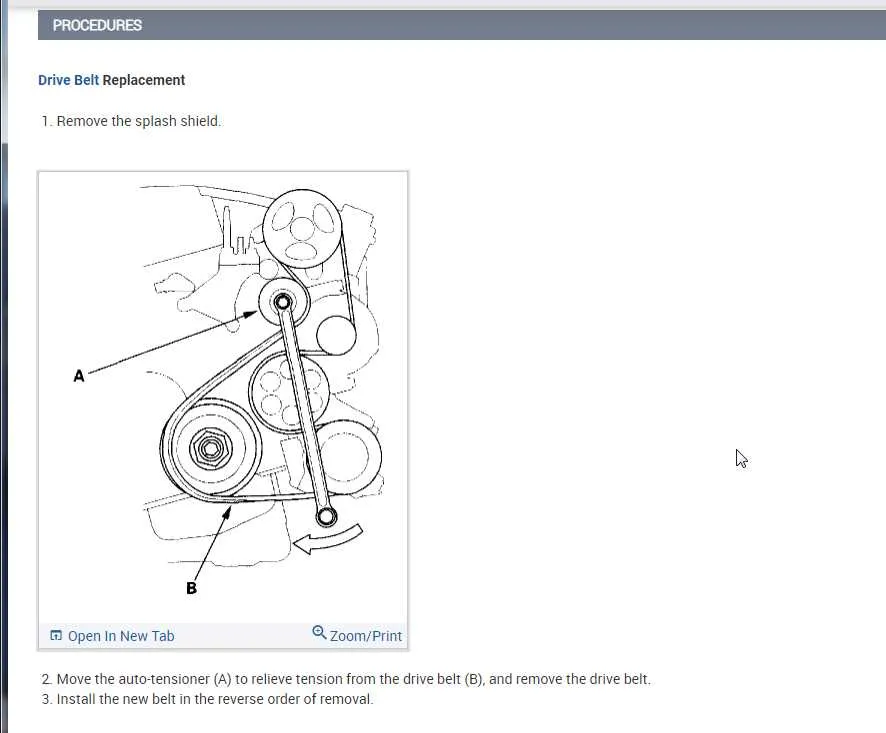
Follow the serpentine belt diagram to ensure correct installation on a 2005 Honda CRV. The diagram details the belt’s path around the alternator, power steering pump, air conditioning compressor, and crankshaft pulley, maintaining proper tension and alignment.
Use the diagram to locate the tensioner and relieve pressure safely with a 14mm socket or wrench. Applying force in the proper direction prevents damage to the tensioner and surrounding components, simplifying belt replacement.
Inspect the belt along the route shown in the diagram for cracks, fraying, or rib glazing. Replace the belt immediately if any damage is detected. Following the diagram minimizes slippage and noise while maintaining smooth operation of engine accessories.
Keep a printed or digital copy of the serpentine belt diagram in the engine bay or repair folder. Reference it during routine maintenance or when replacing components like the alternator or water pump to guarantee correct routing and reliable performance.
2005 CRV Serpentine Belt Diagram Practical Guide for Maintenance and Replacement
Inspect the serpentine belt for cracks, fraying, or glazing before starting any maintenance. A worn belt can slip or break, affecting the alternator, power steering, and air conditioning performance.
Locate the tensioner pulley using the belt diagram. Release tension by turning the tensioner with a wrench or socket, then slide the belt off the pulleys. Keep track of the belt routing to ensure correct reinstallation.
Clean all pulley surfaces to remove dirt and debris that can accelerate belt wear. Check for misalignment or wobbling pulleys, which can reduce belt lifespan.
Install the new serpentine belt following the diagram. Make sure it sits correctly in all pulley grooves and aligns with the tensioner. Slowly release the tensioner to apply proper tension.
Rotate the engine manually with a socket on the crankshaft pulley to confirm the belt moves smoothly without slipping. Recheck belt alignment and tension after a short test drive.
Schedule regular inspections every 30,000 miles or sooner if unusual noises or vibrations occur. Early detection of wear extends the life of both the belt and the connected accessories.
Identifying the Serpentine Belt Routing in a 2005 CRV
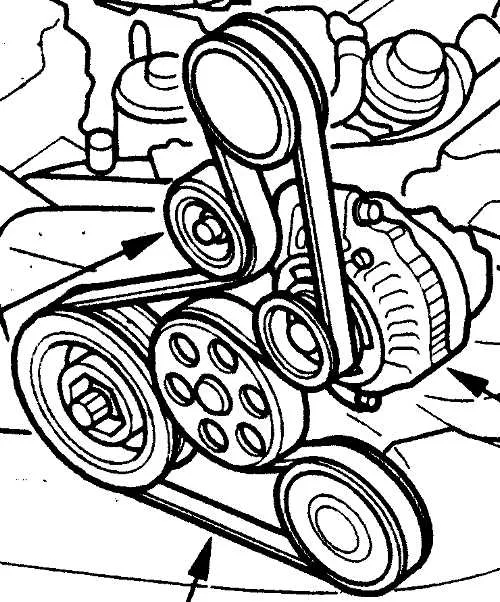
Locate the front of the engine and identify the main components: the crankshaft pulley, alternator, power steering pump, and air conditioning compressor. The serpentine belt wraps around these pulleys in a continuous path.
Begin at the crankshaft pulley at the bottom of the engine. From there, the belt moves upward to the alternator pulley on the passenger side, then routes around the tensioner pulley located near the center of the engine bay.
Next, guide the belt around the power steering pump pulley on the driver side. Ensure the belt sits correctly in the pulley grooves to prevent slipping or noise. After the power steering pump, the belt travels to the air conditioning compressor pulley, maintaining proper alignment.
Finally, loop the belt back down to the crankshaft pulley, completing the circuit. Use the tensioner pulley to apply the correct tension, allowing smooth rotation of all connected accessories.
Double-check the routing against the diagram printed on the engine cover or in the owner’s manual. Each pulley must align with the belt’s ribbed side matching the pulley grooves, preventing misalignment and premature wear.
For removal or replacement, release tension using a wrench on the tensioner, then carefully lift the belt off each pulley following the identified routing. When reinstalling, follow the same path in reverse, confirming the belt maintains proper seating on every pulley.
Step-by-Step Instructions to Replace the Serpentine Belt
Park the 2005 CRV on a flat surface and disconnect the negative battery terminal to prevent electrical hazards.
Locate the serpentine belt routing diagram on the radiator support or under the hood. If the diagram is missing, sketch the belt path manually before removal.
Use a wrench or serpentine belt tool to rotate the tensioner clockwise and relieve tension on the belt. Slide the belt off the pulleys starting with the easiest accessible one.
Inspect all pulleys for wear, noise, or damage. Replace any pulleys showing grooves, cracks, or wobbling before installing the new belt.
Position the new belt over the pulleys following the routing diagram. Begin with the crankshaft pulley and work around major accessories, leaving the tensioner pulley for last.
Rotate the tensioner again to allow the belt to slip over the tensioner pulley. Slowly release the tensioner to apply proper tension.
Double-check the belt alignment on each pulley. Ensure the belt sits fully in the pulley grooves and matches the diagram path exactly.
Reconnect the negative battery terminal, start the engine, and observe the belt operation. Listen for slipping or unusual noises and adjust if necessary.
Troubleshooting Common Belt Issues Using the Diagram
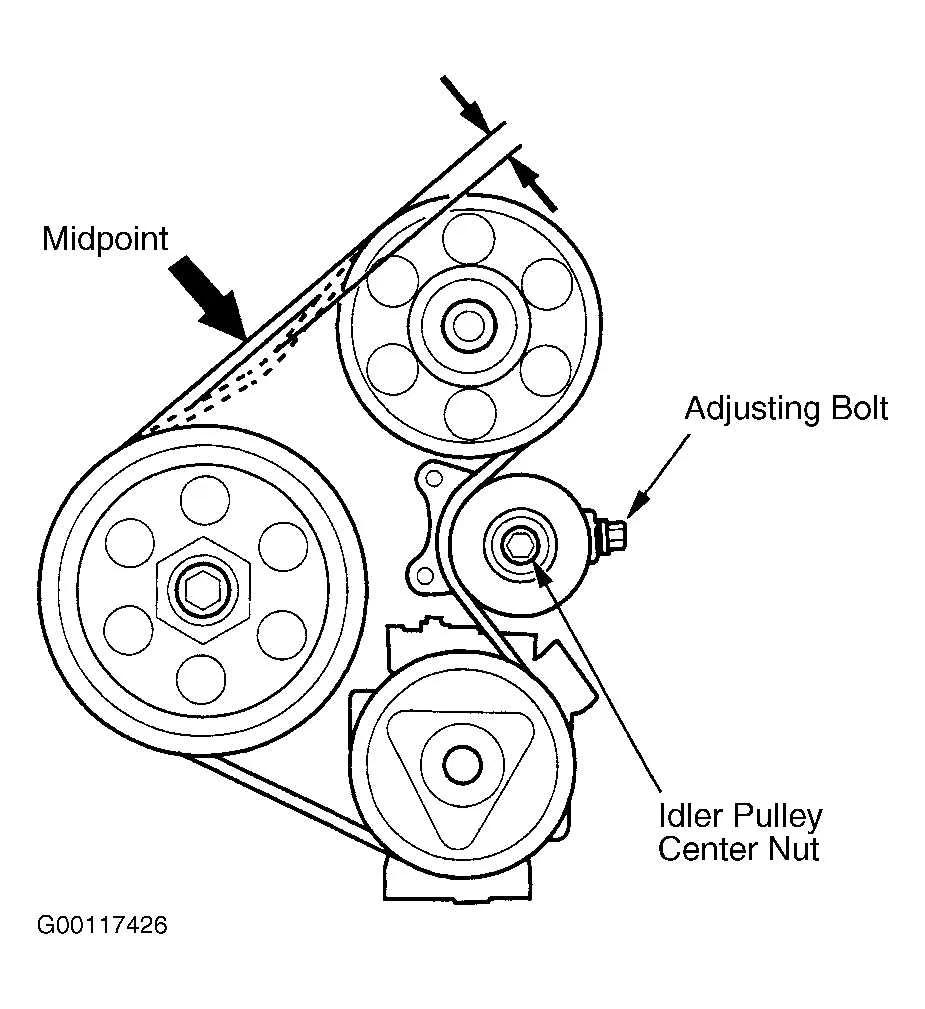
Inspect the serpentine belt for visible cracks, fraying, or glazing along the ribbed side. Use the 2005 CRV belt diagram to confirm correct routing before starting any adjustments.
Check belt tension at the tensioner pulley. The diagram indicates the tensioner location, allowing you to measure deflection accurately. A properly tensioned belt should deflect about 1/4 inch when moderate pressure is applied.
Listen for squealing noises during engine startup or acceleration. Identify the pulleys connected in the diagram, as misaligned or worn components often cause noise. Adjust or replace the affected pulley according to the diagram layout.
Verify that all accessories–alternator, power steering pump, A/C compressor–follow the routing path shown in the diagram. Misrouting can lead to premature wear or slippage.
Inspect the belt for contamination with oil or coolant. The diagram helps isolate which components might leak onto the belt, enabling targeted repair before reinstalling the belt.
Replace the belt if multiple signs of wear appear. Follow the diagram step by step to thread the belt correctly, ensuring proper contact with each pulley groove and correct alignment across the system.
Use the diagram to double-check serpentine belt path after replacement. Confirm that the belt wraps around all pulleys as shown, paying attention to direction on the tensioner and idler pulleys to prevent improper tension or slipping.
- Visual inspection for cracks, fraying, or glazing
- Check tensioner deflection using diagram reference
- Identify pulleys causing squealing noise
- Confirm accessory routing matches diagram
- Check for oil or coolant contamination
- Follow diagram precisely during belt replacement
- Verify post-installation alignment with diagram