Belt Conveyor Diagram and Its Key Components Explained
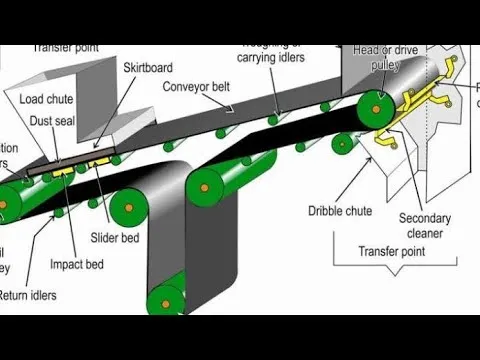
Belt conveyors are a critical component in many industries, moving materials over varying distances and elevations. Understanding their layout is key to ensuring smooth operation and minimizing downtime. In a belt conveyor system, the diagram provides a clear visual of the components involved, such as pulleys, belts, and drives, as well as their alignment. A well-designed diagram highlights the necessary parts, helping technicians and engineers maintain and troubleshoot systems more effectively.
The drive unit plays a central role in the conveyor’s operation. It transfers power to the belt, typically via a motor, and adjusts speed or direction as needed. The pulley configuration also affects the flow of materials, influencing the direction, tension, and speed of the belt. Ensuring proper pulley alignment prevents wear and tear on the system, prolonging its lifespan.
Each component in a belt conveyor diagram must be considered in terms of its function and integration with the rest of the system. Correct tension in the belt ensures a smooth flow of materials, while avoiding slippage or excessive wear. Understanding the diagram’s details helps operators make informed decisions on maintenance and adjustments, keeping the conveyor system running efficiently.
Belt Conveyor Diagram
A belt conveyor diagram illustrates the key components of a conveyor system. This diagram includes the belt itself, pulleys, rollers, motors, and support frames, showing their arrangement and interaction. The conveyor belt operates by transferring materials from one point to another using a continuous loop, powered by an electric motor or other drive systems.
The diagram typically highlights the path of the belt, the direction of movement, and the position of the pulleys. The drive pulley initiates the movement, while the idler pulleys maintain the belt’s tension and support. Rollers are strategically placed along the belt to reduce friction and allow smooth movement of materials. Each component plays a role in ensuring the system runs efficiently.
For proper operation, the diagram helps in identifying potential maintenance areas. Monitoring belt alignment, adjusting tension, and checking for wear are critical to prolonging the system’s life. Additionally, understanding the flow of materials helps with troubleshooting and optimizing system performance.
When reviewing a belt conveyor diagram, focus on the mechanical structure and how each part interacts to move the belt. It’s important to consider the dimensions of the belt, its capacity, and the speed at which it operates. These factors directly impact the system’s output and efficiency.
Understanding the Key Components of a Belt Conveyor System
The main components of a belt conveyor system include the conveyor belt, pulleys, idlers, motor, and frame. Each part plays a specific role in ensuring smooth operation and efficiency.
The conveyor belt itself is the most visible component. It carries materials from one point to another, supported by pulleys. Pulleys are located at both ends of the conveyor, with the drive pulley being powered by the motor. The tail pulley, located at the other end, helps to return the belt to its starting point.
Idlers are crucial for supporting the conveyor belt along its length. They help maintain proper tension and keep the belt running smoothly. These are usually placed at regular intervals along the conveyor to minimize wear and reduce friction.
The motor powers the drive pulley, enabling the belt to move. The motor is typically connected to the pulley via a gearbox or coupling system to control the speed and torque of the belt. Depending on the load requirements, motors vary in power and size.
The frame of the conveyor system provides structural support to all other components. It holds the pulleys, idlers, and motor in place, and it ensures the system operates in alignment. The frame is made of strong materials, such as steel, to withstand the stresses of continuous operation.
Regular maintenance and inspection of these components are essential for preventing breakdowns and ensuring the system runs smoothly over time. Pay close attention to wear on the belt, alignment of the pulleys, and condition of the motor to maintain optimal performance.
How to Read and Interpret a Belt Conveyor Diagram
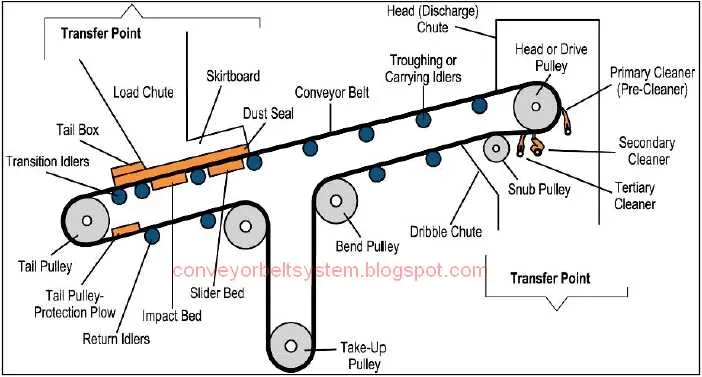
To interpret a belt conveyor diagram, focus on key components like pulleys, rollers, and the belt itself. Identify the flow direction of materials and understand how the conveyor moves items from one point to another. Each component, like the drive pulley, return pulley, and idlers, has a specific role that is often represented in the diagram with clear symbols.
Pay attention to the layout of the belt and how it aligns with the conveyor’s system. Diagrams often show the belt’s tension points, which help you understand how the system distributes weight and forces. Note the drive mechanism and the direction of rotation for accurate setup and troubleshooting.
Conveyor diagrams may include labels or part numbers that correspond to specific components, such as motor specifications or roller types. Cross-reference these details with the manufacturer’s manual to ensure accuracy. It’s also important to observe the spacing and arrangement of components for maintenance and repairs.
Lastly, check for any safety symbols or notes that may indicate required safety measures or warnings, especially near high-speed or high-tension areas. This can help prevent errors during installation or operation.
Common Issues and Troubleshooting Tips for Belt Conveyors
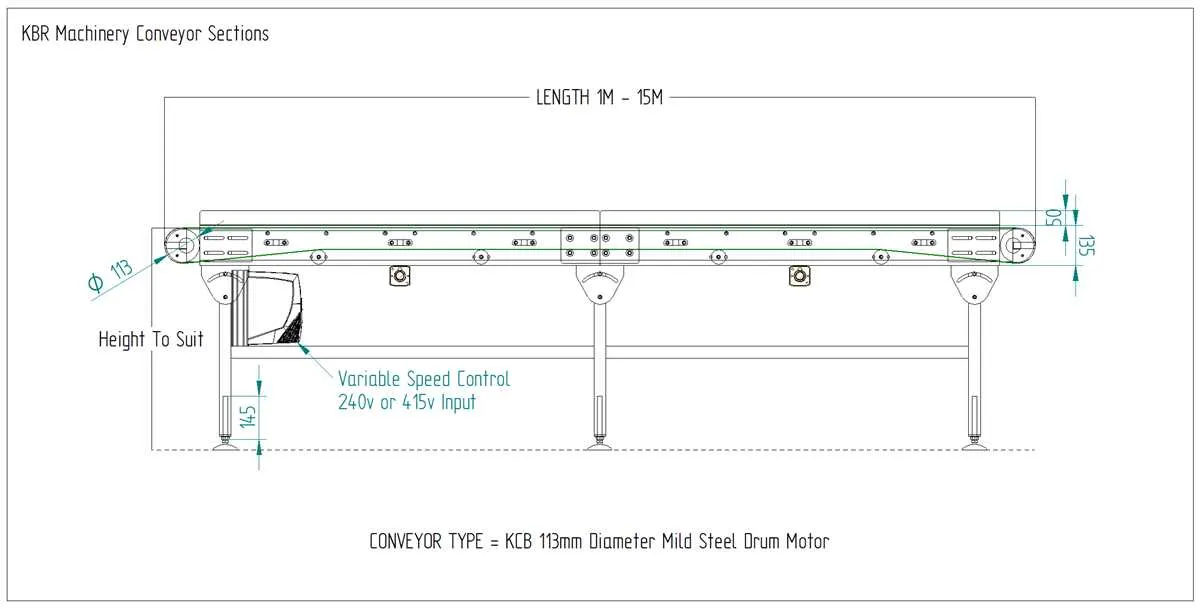
When a belt conveyor malfunctions, the primary causes often relate to misalignment, slippage, or wear and tear on the belt. Here are some troubleshooting tips to quickly identify and resolve issues:
- Belt Misalignment: This occurs when the belt drifts off the pulley or the conveyor frame. To fix this, adjust the tracking system or check for debris that may be obstructing the alignment.
- Belt Slippage: Slippage is caused by insufficient tension or worn pulleys. Increase the belt tension by adjusting the take-up unit, or replace worn pulleys that could be causing friction loss.
- Worn or Damaged Belts: Regularly inspect belts for visible