John Deere ZTrak Drive Belt Diagram and Installation Guide
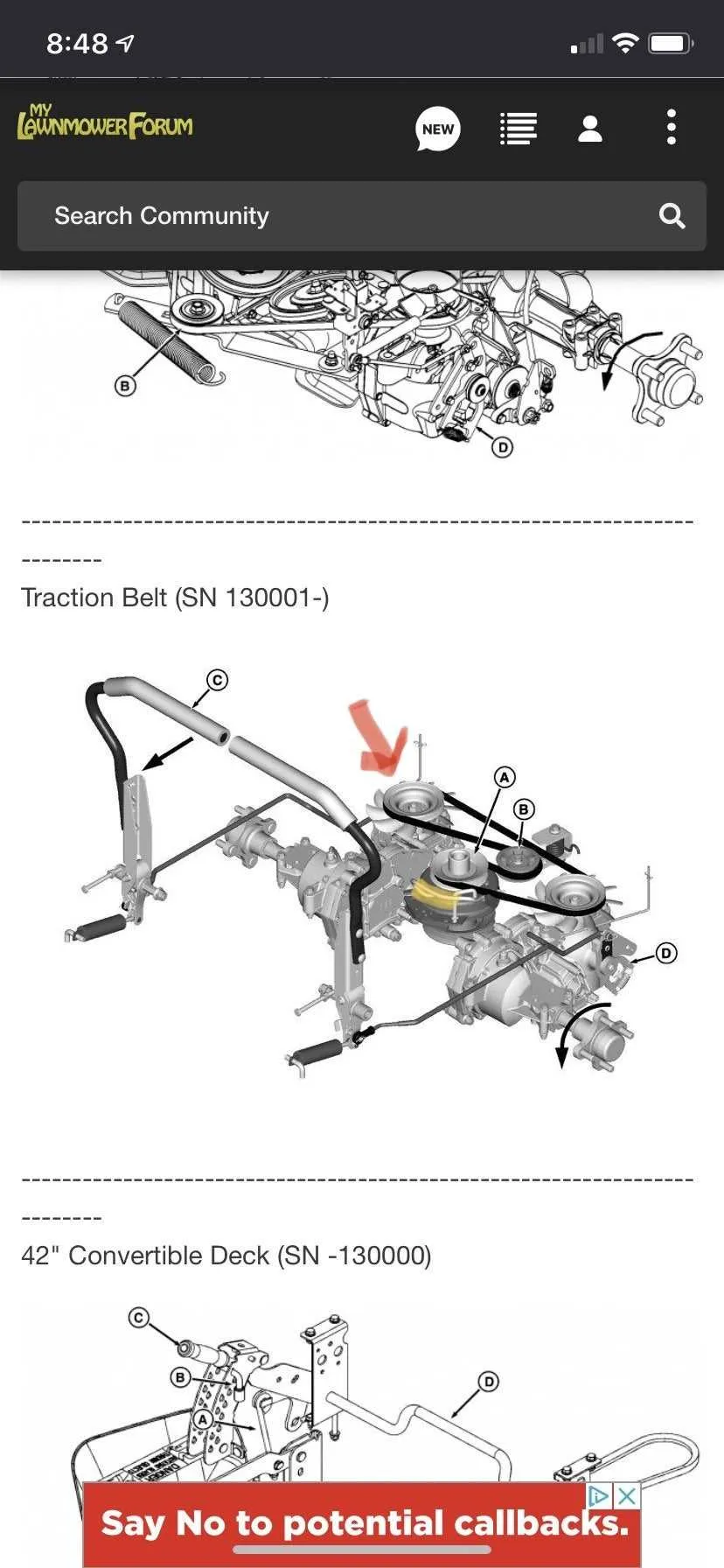
If you need to replace or maintain the drive belt on your John Deere ZTrak mower, having a clear diagram is key to understanding the system’s layout. A proper diagram helps you identify the correct placement and routing of the drive belt, ensuring smooth operation. The ZTrak series features various models, so it’s important to refer to the specific diagram for your mower model.
The drive belt connects multiple components within the mower’s transmission system. It transfers power from the engine to the wheels, enabling the mower to move forward or backward. Inaccurate belt installation or worn-out belts can cause performance issues or even prevent the mower from running. Follow the diagram carefully, and make sure each pulley and tensioner is in its designated place.
Pay attention to the routing path and the proper alignment of the belt, as it will directly affect the mower’s functionality. Incorrect routing or misaligned belts can lead to unnecessary wear and tear on the mower, reducing its lifespan. Check the belt tension regularly to avoid slippage or over-tightening, which could damage the engine or other parts of the system.
John Deere ZTrak Drive Belt Diagram
Refer to the diagram for a clear view of the John Deere ZTrak drive belt system. This diagram shows the exact routing and positioning of the drive belt for optimal performance. If you’re replacing or adjusting the belt, follow these steps closely to ensure proper installation and avoid common issues like slippage or uneven tension.
- Ensure the machine is powered off and the parking brake is engaged.
- Start by removing the engine guard and locating the drive belt system.
- Use the diagram to identify the belt’s path, which typically runs from the engine pulley to the drive pulley and idler pulleys.
- Loosen the tension on the drive belt by adjusting the idler pulley, making it easier to remove.
- After removing the old belt, align the new one according to the diagram. Pay special attention to the direction of the pulleys and any alignment marks.
- Ensure the belt is properly tensioned and not too loose or too tight, as improper tension can lead to damage or reduced efficiency.
- Reattach the engine guard, start the machine, and test the functionality of the belt by engaging the drive system.
For any issues with belt wear or alignment, double-check the routing diagram and inspect pulleys for any signs of wear or damage. Keep the diagram handy for future reference during maintenance or repairs.
How to Identify the Correct Drive Belt for Your John Deere ZTrak Model
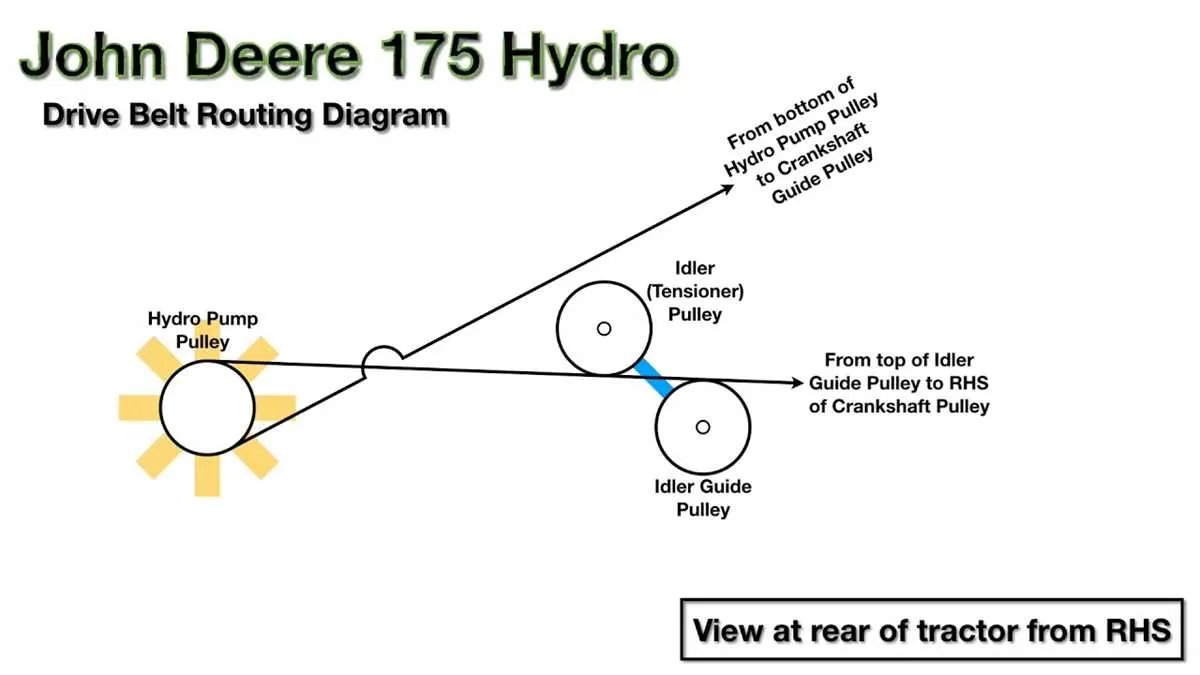
Check the model number of your John Deere ZTrak mower first. It’s usually located on a metal plate near the seat or under the hood. Once you have the model number, you can access the specific parts list for your mower.
Visit the official John Deere website or authorized parts retailers to find the exact drive belt part number. Cross-reference your model number with the recommended belt specifications in the parts manual.
Pay attention to the belt length, width, and type (whether it’s a standard or heavy-duty belt) to match your mower’s requirements. Measure your old belt’s length if possible to confirm its specifications. Always choose belts designed specifically for your model to avoid compatibility issues.
When replacing the belt, ensure the part number matches the one in your owner’s manual for precise fitment. A proper fit will improve performance and extend the life of both the belt and the mower.
If unsure, contact a local John Deere dealer with your model number and they can assist in confirming the correct belt for your machine.
Step-by-Step Guide to Replacing the Drive Belt on a John Deere ZTrak
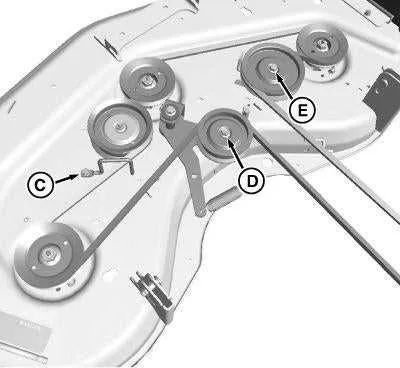
Begin by ensuring the mower is turned off and the key is removed. Wear gloves for safety to avoid injury from sharp parts or moving components.
Lift the mower deck for better access to the drive belt. Most models require raising the deck to its highest position. Use the jack or lifting mechanism on the ZTrak for this purpose.
Remove the deck belt cover. This may involve unscrewing or unbolting the cover, depending on the model. Keep track of the fasteners for reassembly.
Locate the drive belt. It’s typically situated around the engine pulley, the deck pulleys, and the idler pulley. Inspect the belt for signs of wear or damage, which might explain why it needs replacing.
Loosen the tension on the drive belt by adjusting the idler pulley. This often involves loosening a bolt or releasing a spring mechanism. Once the tension is off, carefully remove the belt from the pulleys. Note the belt’s routing to ensure correct installation of the new one.
Install the new drive belt by following the same routing as the old belt. Ensure it is properly seated on each pulley. Make sure the belt is snug, but not overly tight.
Reassemble the deck cover and fasten any screws or bolts you removed earlier. Double-check all connections to ensure nothing is loose or improperly installed.
Lower the mower deck back into position. Test the new belt by turning on the mower and running it briefly to make sure everything is functioning smoothly.
Common Issues with Drive Belts on John Deere ZTrak and How to Troubleshoot Them
If your John Deere ZTrak is showing signs of drive belt issues, start by checking for signs of wear and tear. Inspect the belt for fraying, cracks, or missing sections. These can all lead to poor performance or a complete failure to engage the drive system.
One of the most common issues is a loose or improperly adjusted belt. This can cause the mower to lose power or fail to move properly. To fix this, adjust the belt tension according to the specifications in your user manual. Make sure the idler pulleys are functioning smoothly and the belt is seated correctly in all grooves.
Another issue could be dirt or debris trapped in the pulleys. Dirt buildup can affect the smooth operation of the belt, leading to slipping or inconsistent performance. Clean the pulleys thoroughly, removing any grass, mud, or other debris. This can restore proper belt engagement and prevent unnecessary wear.
If the belt is slipping even after adjustments, check for worn-out pulleys or a misaligned drive system. Worn-out pulleys won’t provide the necessary grip, causing the belt to slip. Replace any damaged or worn pulleys as soon as possible to avoid further damage.
Finally, if the belt continues to wear out too quickly or frequently, it could be a sign of an underlying issue with the mower’s drive system. Inspect the tension springs and other components for signs of wear. A faulty component in the drive system can cause uneven belt tension, leading to premature belt wear.