Detailed diagram guide for John Deere Stx38 belt installation and replacement steps
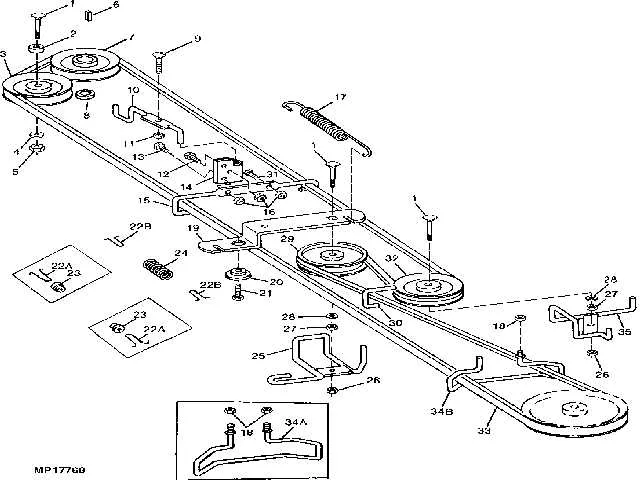
Replace the deck belt on a John Deere STX38 by following the correct routing diagram specific to your model–yellow or black deck. The two versions use different belt paths, and installing the wrong configuration can damage pulleys or cause improper blade engagement.
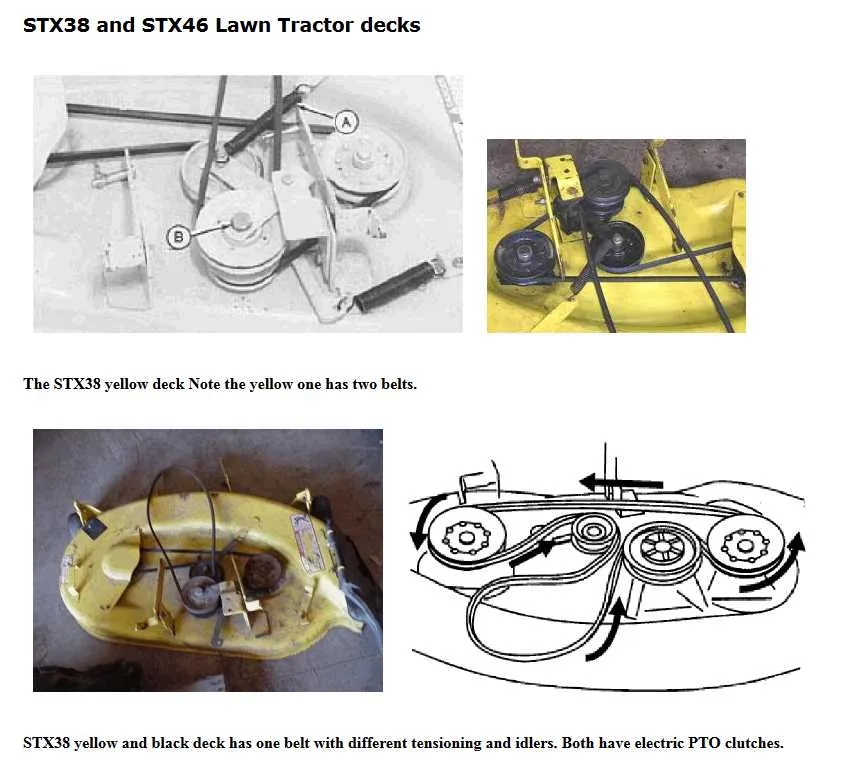
For the yellow-deck STX38, the belt routes from the engine pulley to the right-side idler, wraps around both blade pulleys, and loops back through the tensioner. This setup uses a single flat belt, typically John Deere part number M82462. Always disengage the mower deck and remove the spark plug wire before replacing the belt.
If your tractor has a black deck, the belt diagram changes. It typically uses belt part number M110313 and includes a double pulley system with a spring-loaded idler on the left. Misalignment here often leads to belt slippage or uneven cutting. Check that the belt rides inside all guide pins and clears the mower lift brackets.
Inspect pulleys for wobble and replace any that show wear. Clean the spindle housing area before installing a new belt to avoid contamination. After installation, engage the blades briefly to ensure smooth movement without vibration or noise.
STX38 John Deere Belt Diagram
Refer to the exact model variant of your STX38 before replacing the belt–black deck and yellow deck versions have different routing. For the yellow deck model, route the mower deck belt around the outermost pulleys, ensuring the belt travels from the PTO clutch at the engine pulley, down to the right idler, across both spindle pulleys, and around the left-side tensioner. Use spring-loaded tension to secure the belt without overtightening.
For the black deck version, note that the belt travels in a different path due to the deck design. It wraps from the engine pulley to the right idler pulley, across both blade spindle pulleys, and finishes at the left idler. A deck-level tension spring manages the slack. Misrouting will cause uneven blade rotation or belt slippage, so verify alignment before operation.
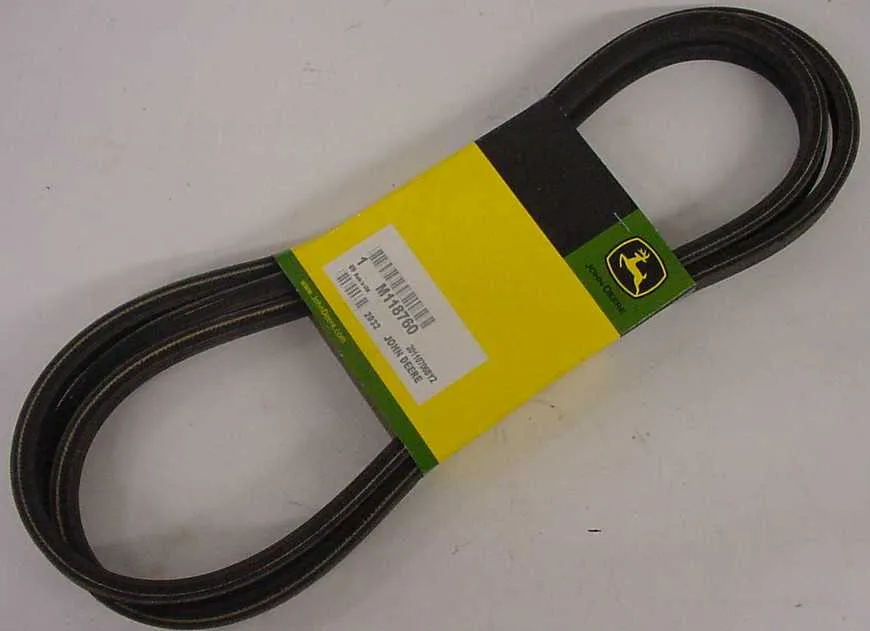
Before installation, inspect pulleys for wear and ensure bearings rotate freely. Use a factory-spec belt–John Deere part number M82462 for the yellow deck, and M110313 for the black deck. Never substitute belts with off-size replacements; incorrect tension causes premature wear or deck damage.
After installation, engage the PTO and check for consistent belt tension and smooth operation at full throttle. Shut down the engine, recheck alignment, and retighten the deck mounts. This process helps prevent early belt failure and uneven cutting results.
How to Identify and Locate Each Belt on the Stx38 Mower
Begin by lowering the mower deck to its lowest position and disconnecting the spark plug for safety. Focus first on the mower deck drive belt. This belt connects the engine pulley to the deck pulley system and runs underneath the mower. Locate it by following the path from the engine’s vertical shaft pulley down to the deck’s center pulley, then out to the blade spindles. Check for wear near the tensioner pulley and idler arm–common failure points.
Next, locate the transmission drive belt. This belt links the engine pulley to the rear transaxle and is found beneath the rear fender deck. Remove the seat and rear cover panel to access it. The belt wraps around a variable speed pulley near the center of the frame and loops back to the transaxle pulley above the differential housing. Pay attention to the belt guides on either side of the pulley to ensure proper alignment during replacement.
Inspect both belts for cracks, glazing, or fraying. Belt tension should feel firm but not overly tight. If either belt shows signs of slipping or visible damage, replacement is necessary. Always match new belts to the model number–STX38 models use different belts depending on whether the deck is black or yellow. Use the stamped part numbers on the old belts as a reference if available.
Step-by-Step Guide to Replacing the Drive and Deck Belts on the STX38
Disconnect the spark plug wire to prevent accidental starting. Park the mower on a flat surface and lower the deck fully.
Remove the mower deck by pulling the cotter pins and washers from the front draft rod, rear lift links, and side brackets. Slide the deck out from under the mower frame.
Take off the deck belt by releasing tension from the idler pulley using a 3/8-inch socket wrench. Slip the belt off the pulleys and inspect all spindles and pulleys for wear or wobble before installing the new belt.
Install the new deck belt by following the correct routing pattern. For the yellow-deck STX38, the belt runs around the two spindle pulleys, idler pulley, and around the engine drive pulley. Keep the belt centered on each pulley to avoid uneven wear.
Reinstall the mower deck by aligning it under the tractor and reconnecting all rods, links, and brackets in reverse order. Make sure all pins and clips are secure.
To replace the drive belt, remove the mower deck again if installed. Take off the rear fender deck by removing the bolts under the seat and lifting the assembly. Pull the belt from the transmission pulley, tensioner, and engine pulley. Be cautious of spring-loaded pulleys and take note of the original belt path.
Thread the new drive belt starting at the transmission pulley, then over the idler pulleys, and finally around the engine pulley. Check that the belt is fully seated in all grooves.
Reinstall the fender deck and tighten all bolts. Reattach the spark plug wire. Test the mower at low throttle to confirm smooth operation of the drive and deck systems without belt slipping or vibration.
Troubleshooting Common Belt Issues Using the STX38 Diagram
Check belt alignment against the STX38 diagram before adjusting anything. A misrouted belt causes premature wear and erratic blade engagement. Confirm that the belt wraps correctly around the engine pulley, deck idlers, and blade mandrels without twisting.
- Slipping Belt: Inspect for glazing or cracking. A belt that slips under load typically has lost tension or is contaminated with oil. Clean pulleys with degreaser and replace any weak tensioner springs. Use the diagram to verify spring placement and pulley routing.
- Belt Keeps Coming Off: Worn pulley bearings or bent brackets usually cause ejection. Spin each pulley by hand and check for play. Use the diagram to compare bracket angles and ensure no misalignment exists. Replace damaged components before reinstalling the belt.
- Uneven Cutting: If the blades rotate at inconsistent speeds, inspect belt stretch or uneven tensioning. The diagram shows the correct tension path. Check all idler pulleys and pivot points for seized movement or obstructions.
- Noise or Vibration: A misrouted belt can create whirring, squealing, or thumping. Use the diagram to compare routing step-by-step. Tighten all mounting bolts and check that pulleys spin freely without wobble.
Always disengage the PTO and disconnect the spark plug before handling the belt. Refer to the diagram during reassembly to avoid routing mistakes, especially around the deck engagement mechanism. A single misplaced wrap can shorten belt life significantly.