2005 Nissan Xterra Serpentine Belt Routing Diagram and Repair Guide
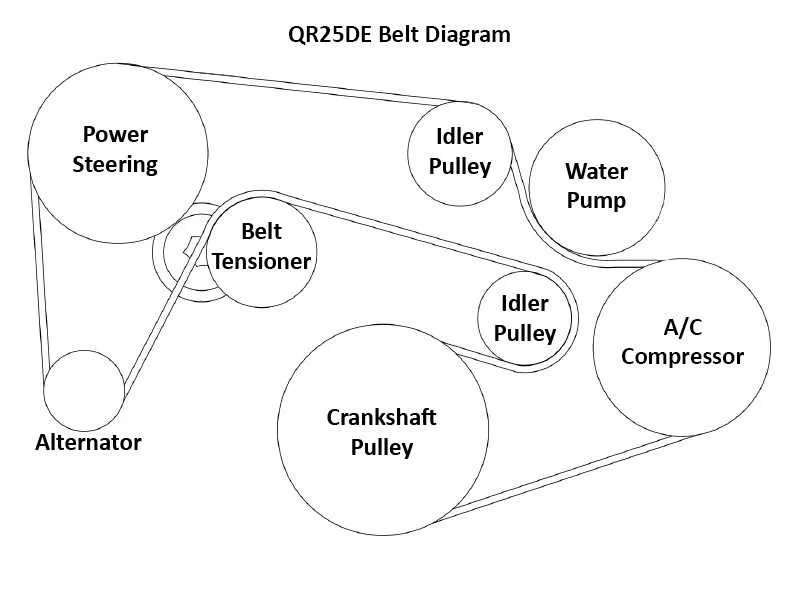
For an accurate and hassle-free repair of your 2005 Nissan Xterra, having the right belt diagram is crucial. Whether you’re replacing the serpentine belt or inspecting other pulleys, understanding the proper routing can save you time and effort. The belt diagram visually represents the exact path the belt should follow around the engine components, ensuring all systems work smoothly.
Check the diagram before making any adjustments or replacements to avoid damaging engine parts. The serpentine belt powers key components like the alternator, power steering pump, and air conditioning compressor. If you’re facing a squealing sound or power loss, the belt could be worn out or misaligned. Make sure the new belt matches the original routing shown in the diagram for optimal performance.
Be mindful of belt tension as well. It’s common to overlook this aspect during maintenance. Incorrect tension can lead to premature wear and even belt failure. Ensure the belt is tight enough to avoid slipping, but not so tight that it strains the components. Refer to your 2005 Xterra’s manual for specific measurements or consult a mechanic if unsure about tension adjustments.
2005 Nissan Xterra Belt Diagram
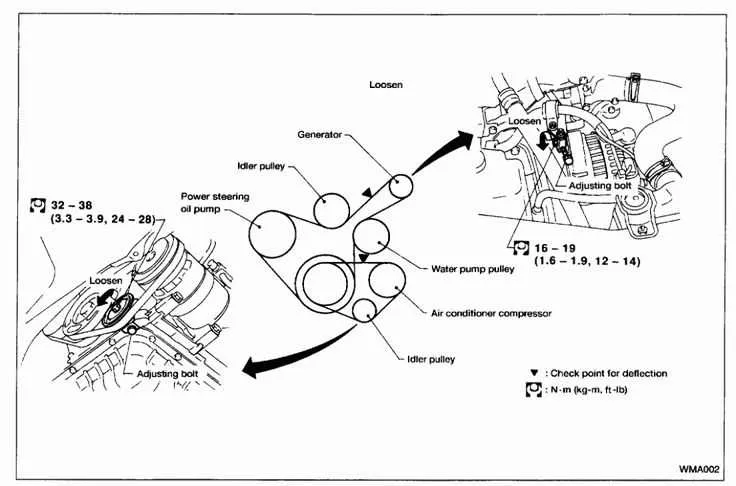
For accurate belt routing on your 2005 Nissan Xterra, refer to the following configuration. This setup is vital for ensuring proper function of key components like the alternator, power steering pump, and air conditioning compressor.
The main serpentine belt for the 2005 Xterra routes over the crankshaft pulley, tensioner, water pump, power steering pump, alternator, and air conditioning compressor. The tensioner pulley keeps the belt taut. If you’re replacing the belt, check the tensioner for wear and replace it if necessary to avoid future issues.
Steps for Replacement:
- Use a socket wrench to rotate the tensioner and relieve belt tension.
- Remove the old belt and inspect each pulley for damage or wear.
- Install the new belt, following the routing diagram carefully.
- Check that the belt is properly seated in all grooves and that the tension is correct.
To confirm you’re using the right parts, ensure the belt length matches the OEM specifications, and always verify the tension after installation.
Step-by-Step Guide for Replacing Belts on a 2005 Nissan Xterra
Locate the drive belts on the engine. You’ll find the serpentine belt running across the front, and possibly other accessory belts depending on your configuration.
Before removing any belt, loosen the tensioner pulley. Use a wrench or socket to turn the tensioner in the direction specified in the service manual. This will relieve the tension on the belt.
Carefully remove the belt from its pulleys. Make sure to note how the belt is routed around the pulleys for reinstallation. If needed, refer to a diagram of the engine belt layout for guidance.
Inspect the belt for any wear, cracks, or damage. If the belt shows signs of deterioration, replace it with a new one that matches the specifications of the original. Also, check the condition of the pulleys and tensioner to ensure they are in good shape.
Place the new belt on the pulleys, following the original routing. Align it carefully to ensure it fits securely in place, and check the tensioner’s position.
Reapply tension to the belt by adjusting the tensioner back to its original position. The belt should be tight enough to prevent slipping but still allow slight movement when pressed by hand.
Finally, turn the engine on and observe the belt’s movement. Listen for any abnormal sounds or irregularities, and ensure the belt is operating smoothly without slipping.
If everything checks out, you’ve successfully replaced the belts on your 2005 Nissan Xterra!
Common Issues with Belt Alignment on the 2005 Nissan Xterra
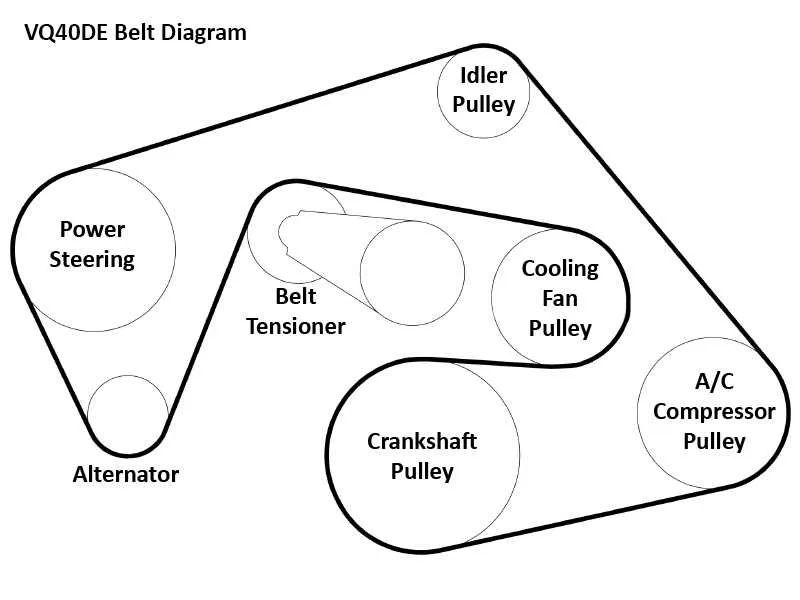
If you notice unusual noises or irregular engine performance, the issue might lie with the belt alignment. Misalignment can cause significant wear on both the serpentine belt and the engine pulleys. Below are the most common causes of belt alignment problems in the 2005 Nissan Xterra:
- Worn or Damaged Pulleys: Over time, pulleys can wear out or become misaligned. This leads to uneven belt tension, which accelerates belt wear and increases the risk of slippage. Inspect each pulley carefully for cracks, wobbling, or any signs of damage.
- Improper Belt Tension: Incorrect tension can cause the belt to either slip or remain too tight, both of which affect alignment. A loose belt won’t maintain proper contact with pulleys, while a tight belt may stress the engine components. Always check the manufacturer’s specifications for correct tension.
- Faulty Belt Tensioner: The tensioner plays a key role in maintaining belt tension. A malfunctioning tensioner can result in poor belt alignment, leading to squealing or slipping. If the tensioner feels loose or is no longer spring-loaded, it’s time for a replacement.
- Worn or Misaligned Idler Pulley: The idler pulley helps guide the belt through the system. If it’s misaligned or worn out, the belt will not track properly, leading to excessive friction and premature wear.
- Incorrect Belt Installation: Incorrect belt routing during installation can cause significant alignment issues. Always refer to the manufacturer’s belt diagram for the correct routing to avoid tension imbalances or slippage.
To avoid these problems, regularly inspect the serpentine belt and its components for wear or damage. If you notice any misalignment or hear strange noises from the engine bay, address the issue immediately to prevent further damage and ensure smooth engine operation.