John Deere D140 Belt Routing Guide for Proper Maintenance and Replacement Steps
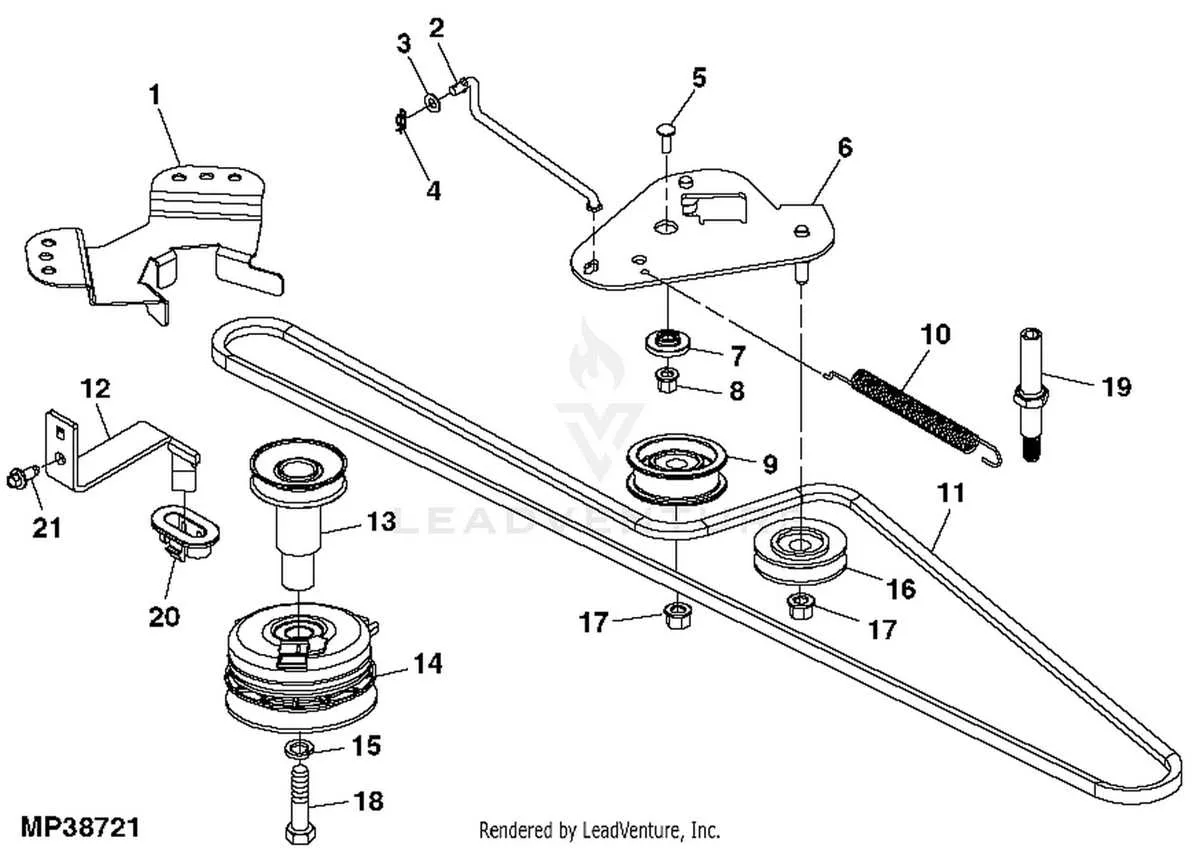
Locate the main drive belt on your John Deere D140 mower by removing the mower deck and inspecting the pulley system. The belt runs through a series of pulleys including the engine pulley, idler pulley, and blade spindles, forming a precise routing path necessary for proper mower function.
Follow the belt diagram carefully to ensure each pulley is engaged correctly. Misalignment or incorrect placement causes premature belt wear or loss of blade power. Always release belt tension before removal to avoid damaging the tensioner spring.
Replace the belt with the exact JD OEM part number or a verified compatible alternative. Check the belt’s length and width against the original to guarantee a snug fit. After installation, rotate the pulleys by hand to confirm smooth movement before powering on the mower.
Identifying and Understanding Each Belt on the JD D140
The JD D140 uses two primary belts: the engine drive belt and the mower deck belt. The engine drive belt connects the engine pulley to the transmission, transferring power to move the tractor forward. Check this belt regularly for cracks or fraying, as wear affects performance and safety.
The mower deck belt runs from the engine pulley to the mower blades, enabling cutting action. It typically features a specific routing path through idler pulleys to maintain tension. Follow the belt diagram closely during replacement to ensure proper alignment and avoid slippage or blade malfunction.
Each belt has distinct thickness and length specifications; the engine drive belt usually measures wider and thicker than the mower deck belt. Confirm exact part numbers in the operator’s manual to match your model’s requirements. Using incorrect belts can cause premature wear or equipment damage.
Inspect tensioner springs and pulleys associated with each belt. Proper tension maintains belt grip and prevents slipping during operation. Adjust or replace worn components alongside the belts to extend their service life and maintain smooth function.
Regular cleaning of pulleys and belt surfaces removes debris that can cause uneven wear. Lubricate pivot points on idlers and tensioners to keep the system responsive. Combining these steps with periodic belt inspection ensures reliable power transfer and consistent mowing results.
Step-by-Step Guide to Replacing the Jd d140 Drive Belt
Disconnect the spark plug wire to prevent accidental starting. Raise the mower deck to its highest position and secure it with the safety latch.
Locate the drive belt routing using the Jd d140 belt diagram for reference. Remove the deck belt first by releasing tension from the idler pulley using a wrench or socket, then slide the belt off the pulleys.
Next, access the drive belt by loosening the bolts on the belt cover and removing the cover. Carefully note the belt’s path around the pulleys to avoid mistakes during installation.
Release the tension on the drive belt by moving the tensioner pulley away, then slide the old belt off. Inspect all pulleys for wear or debris and clean them before installing the new belt.
Install the new drive belt by following the exact path shown in the belt diagram, making sure it sits correctly on each pulley. Reapply tension to the belt by positioning the tensioner pulley back and tightening any bolts removed earlier.
Reattach the belt cover and tighten all fasteners securely. Finally, lower the mower deck and reconnect the spark plug wire.
Test the mower by engaging the drive system and checking for smooth operation and proper belt alignment. Adjust the belt tension if any slipping or noise occurs.
Troubleshooting Common Belt Issues on the JD D140
Check belt tension regularly; a loose belt slips and reduces performance, while an overly tight belt causes premature wear. Adjust the tension by loosening the mounting bolts and moving the tensioner pulley until the belt deflects about 1/2 inch under moderate pressure.
Inspect the belt for cracks, fraying, or glazing. Replace any belt showing signs of damage to prevent sudden failure. Use only OEM or equivalent belts designed specifically for the JD D140 to ensure proper fit and durability.
Clean pulleys and remove debris or buildup, which can cause the belt to slip or wear unevenly. Use a soft brush or compressed air to clear dirt from grooves and surfaces.
Align pulleys carefully. Misalignment increases belt stress and wear. Use a straightedge or laser tool to confirm pulleys line up correctly along their entire length.
Replace worn tensioner components or pulleys, as these parts affect belt performance directly. Listen for squealing noises that may indicate a failing bearing or tensioner.
After any adjustment or replacement, test the mower under load to confirm the belt runs smoothly and remains in position throughout operation.